Handling a large collection of personal photos, important business documents, or sensitive client information often means dealing with a multitude of files. When it comes to protecting these assets, especially images that might contain private moments or proprietary data, securing them individually can become a tedious and time-consuming chore. Imagine having dozens, or even hundreds, of photos that you need to ensure are only accessible by authorized individuals. Doing this one by one is not only inefficient but also prone to human error, leaving gaps in your security strategy.
This is precisely where the power of batch processing comes into play. Instead of manually encrypting each image file, we can leverage tools and techniques designed to handle multiple files simultaneously. This approach significantly streamlines the security workflow, saving valuable time and ensuring a consistent level of protection across your entire collection. It's a fundamental shift from single-file security to a more robust, scalable solution.
Table of Contents
Understanding Batch Encryption
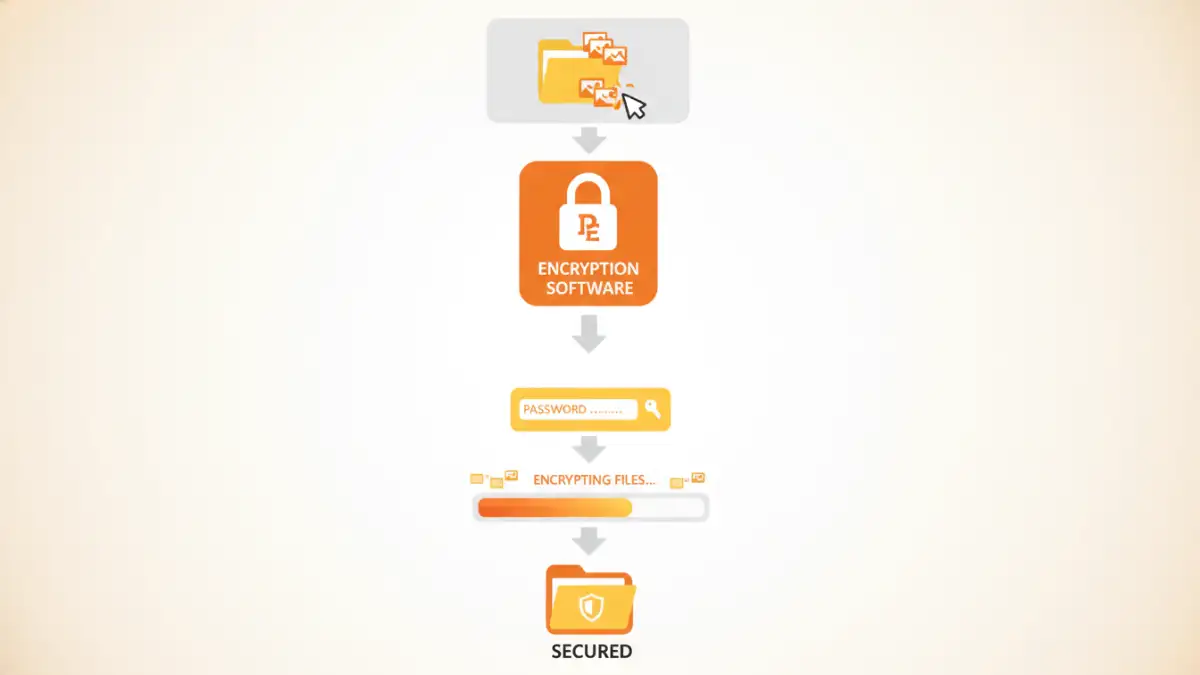
At its core, batch encryption refers to the process of applying encryption to a group of files simultaneously using a single set of parameters, typically a password or a key. Instead of opening and encrypting each file individually, you select a folder or a list of files, and the encryption software processes them all in one go. This is incredibly useful for managing large volumes of data that require consistent security measures.
Key Concepts in Encryption
Encryption involves transforming readable data (plaintext) into an unreadable format (ciphertext) using an algorithm and a secret key. For batch encryption, the same key is applied to all selected files. The strength of the encryption depends on the algorithm used (like AES-256, which is widely considered secure) and the complexity of the password or key. Without the correct key, the encrypted files remain inaccessible.
Why Batch Encrypt Images?
Images can hold sensitive information just as much as documents. Personal photos might capture private moments, while professional photography could include unreleased work or client details. In a business context, architectural plans, product designs, or marketing materials stored as images need robust protection against unauthorized access or theft. Encrypting multiple images at once ensures that your entire collection is secured efficiently, preventing accidental exposure or data breaches.
This is particularly important for photographers, designers, and small businesses that handle a large volume of visual assets. Maintaining privacy and intellectual property is paramount, and bulk image encryption provides a practical solution to safeguard these digital assets without overwhelming manual effort. It’s about implementing a proactive security measure that scales with your needs.
Methods for Batch Encryption
Several approaches can be used for bulk image encryption, ranging from built-in operating system features to dedicated third-party software. Each method offers different levels of security, ease of use, and functionality.
Using Dedicated Encryption Software
This is often the most straightforward and powerful method. Many free and paid software applications are designed specifically for file encryption, including batch processing. Tools like VeraCrypt (free, open-source) allow you to create encrypted containers that can hold multiple files, or encrypt entire drives/partitions. Other commercial options like AxCrypt or BitLocker (built into Windows Pro/Enterprise) offer user-friendly interfaces for encrypting files and folders in batches. You typically select the files or folder, choose an encryption standard, set a strong password, and the software handles the rest.
Command-Line Tools for Advanced Users
For those comfortable with the command line, tools like GnuPG (GPG) offer powerful batch encryption capabilities. You can write simple scripts to iterate through a directory of images and encrypt them using a symmetric cipher with a passphrase. While this requires a steeper learning curve, it offers immense flexibility and can be integrated into automated workflows. For example, a script could automatically encrypt all new images added to a specific folder.
Choosing the Right Tool
The best tool for batch file encryption depends on your technical proficiency, the volume of files, and your specific security requirements. For most users, dedicated encryption software with a graphical interface is the easiest path. Look for tools that support strong encryption algorithms like AES-256 and offer features like password management or secure deletion of original files.
Consider tools that are actively maintained and have a good reputation for security. Free and open-source options like VeraCrypt are excellent choices for those who prioritize transparency and security without cost. If you need advanced features or integration into business workflows, commercial software might offer more comprehensive support and capabilities. Always ensure the tool you choose can handle encrypting multiple images effectively.
Best Practices for Image Security
Beyond just encrypting your files, adopting a holistic approach to image security is crucial. Always use strong, unique passwords for your encryption. Avoid easily guessable passphrases and consider using a password manager to generate and store them securely. Regularly update your encryption software to ensure you benefit from the latest security patches and improvements.
Furthermore, think about where you store your encrypted files. While encryption protects the content, the encrypted file itself could still be lost or stolen. Consider cloud storage with robust security features or secure external drives for backups. Always test your encryption and decryption process to ensure it works correctly and that you can access your files when needed. This proactive approach ensures your valuable image collection remains protected.
Comparison Table
| Method | Ease of Use | Security Strength | Flexibility | Best For |
|---|---|---|---|---|
| Dedicated Encryption Software (e.g., VeraCrypt, AxCrypt) | High (GUI) | Very High (AES-256) | Moderate to High | Most users, general batch encryption |
| Built-in OS Tools (e.g., BitLocker) | Moderate (OS dependent) | High (AES-256) | Moderate (often partition/drive based) | Windows users, full disk encryption |
| Command-Line Tools (e.g., GPG) | Low (requires scripting) | Very High (AES-256) | Very High (scriptable) | Advanced users, automated workflows |
| Archiving with Encryption (e.g., 7-Zip, WinRAR) | High (GUI) | Moderate to High (AES-256) | Moderate | Bundling files, basic encryption needs |