
Working with a large volume of sensitive documents often means needing to secure them efficiently. Manually applying passwords to hundreds or thousands of PDFs is not only time-consuming but also prone to human error. This is where leveraging technology, specifically an API for PDFs, becomes invaluable. It allows for programmatic control, enabling automation and scalability for tasks like applying encryption.
As a software engineer who has navigated these challenges, I've seen firsthand how integrating robust security features directly into applications can save significant time and resources. The ability to automate bulk PDF password protection is a game-changer for businesses dealing with confidential data, client agreements, or internal reports.
Table of Contents
Understanding API Integration for PDFs
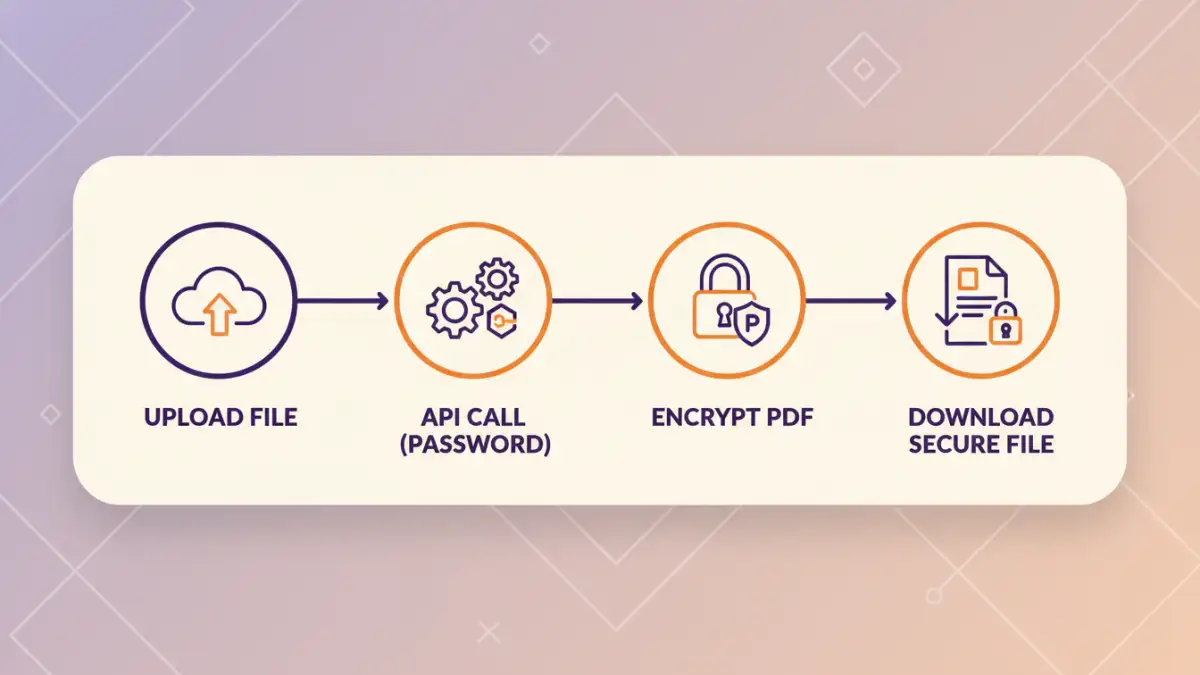
An API, or Application Programming Interface, acts as a bridge between different software applications. In the context of document security, an API for PDFs allows your custom applications, scripts, or platforms to interact with PDF manipulation services. This means you can send instructions, like 'apply password X to file Y,' programmatically, without manual intervention.
This approach is particularly powerful for bulk operations. Instead of opening each PDF individually, you can write code that iterates through a folder of documents, sending each one to the API for password protection. This is the core of automating bulk PDF password protection.
Core Functionality
Most PDF APIs offer a range of functionalities, but for security, the focus is on encryption. This typically involves specifying an encryption algorithm (like AES-256) and a password. The API then processes the PDF, making it unreadable without the correct credentials. This is a fundamental step in securing documents.
Key Benefits of API-Driven Protection

The advantages of using an API for securing documents in bulk are numerous. Scalability is perhaps the most significant. As your document volume grows, your automated system can handle the increased load without a proportional increase in manual effort. This efficiency translates directly into cost savings and faster turnaround times.
Furthermore, consistency is guaranteed. Every document processed through the API will receive the same level of encryption and password protection, reducing the risk of human error or oversight. This ensures a uniform security posture across all your sensitive files.
Enhanced Workflow Automation
Integrating PDF protection into existing workflows is seamless with an API. Imagine a system where new client contracts are automatically encrypted upon upload to a cloud storage or CRM. This level of automation streamlines processes and ensures that sensitive information is protected from the moment it's created or received.
Implementation Steps
Getting started with API integration for PDF security involves a few key stages. First, you need to select a suitable API provider or library. This choice depends on factors like cost, features, and your technical environment. Once chosen, you'll typically obtain API keys or credentials for authentication.
The next step is to write code that interacts with the API. This usually involves making HTTP requests to specific endpoints provided by the API service. You'll send the PDF file and the desired password as parameters. The API will then return the protected file or a status indicating success or failure.
Example Workflow
A common workflow might look like this: your application monitors a specific directory for new PDF files. When a new file appears, the application reads it, determines the appropriate password (perhaps from a configuration file or database), and then sends the file and password to the PDF protection API. The API processes the request, and the application then saves the newly protected PDF, possibly in a different location or overwriting the original.
Choosing the Right Developer Tool
When looking for a developer tool to handle PDF security, consider its capabilities. Does it support the encryption standards you need? How easy is its integration? Look for APIs that offer clear documentation, robust support, and competitive pricing models. Many services offer free tiers or trial periods, allowing you to test their functionality before committing.
The primary keyword, bulk PDF password protection, should be a core offering. Ensure the API can handle large volumes efficiently and without compromising performance. Some APIs might be libraries you install locally, while others are cloud-based services. The choice often depends on your infrastructure and security policies.
API vs. Desktop Software
While desktop software exists for password-protecting PDFs, it typically requires manual operation or complex scripting for automation. An API, on the other hand, is designed for programmatic access, making it the superior choice for true automation and integration into larger systems. It’s a more scalable and robust developer tool.
Advanced Considerations
Beyond basic password protection, some APIs offer granular control over permissions. This means you can not only lock a PDF but also restrict actions like printing, copying text, or editing. This adds another layer of security for highly sensitive documents.
Consider error handling and logging. What happens if the API call fails? Your integration should gracefully handle such situations, log the error, and potentially retry the operation or notify an administrator. This ensures that no documents fall through the cracks.
Best Practices for Secure Document Handling
When implementing bulk PDF password protection, always use strong, complex passwords. Avoid common words or easily guessable patterns. Consider using a password manager to generate and store these credentials securely.
Regularly review your security protocols and the APIs you use. Ensure that the encryption methods are up-to-date and that the API provider adheres to modern security standards. Keeping your tools and methods current is crucial in the ever-evolving cybersecurity landscape.
Comparison Table
| Method | Ease of Use | Scalability | Automation Potential | Security Level |
|---|---|---|---|---|
| Manual Password Entry | High | Low | Very Low | Depends on password strength |
| Desktop Software (with scripting) | Medium | Medium | Medium | Depends on software & password |
| Cloud-Based PDF API | High (via code) | Very High | Very High | High (supports strong encryption) |
| Local PDF Library | Medium (requires coding) | High | High | High (depends on implementation) |