When it comes to safeguarding digital assets, the terms DRM and password protection often come up. While both aim to restrict unauthorized access, they operate on fundamentally different principles and offer varying levels of control. As someone who's spent years architecting and implementing security solutions, I've seen firsthand how choosing the wrong approach can leave valuable data vulnerable or, conversely, create unnecessary hurdles for legitimate users.
The core distinction lies in their scope and enforcement. Traditional file password protection is a straightforward gatekeeper, typically applied directly to a file. DRM, on the other hand, is a more comprehensive system designed to manage and enforce usage rights across a wider ecosystem of content distribution. Understanding this difference is crucial for making informed decisions about how to protect your intellectual property, sensitive documents, or digital media.
Table of Contents
Understanding the Basics
At its heart, securing digital content is about controlling who can access and interact with it. This involves establishing a mechanism to verify identity or authorize actions. Think of it like a physical lock on a door; you need a key or a code to get in. The complexity of that lock and the system it's part of determines how robust the security is.
The Goal of Access Control
The primary goal of any security measure is to implement effective access control. This means ensuring that only authorized individuals or systems can view, modify, or distribute specific content. Whether it's a confidential business report or a copyrighted eBook, the need to prevent unauthorized duplication and distribution is paramount.
Traditional File Password Protection

This is the most common and perhaps simplest form of digital security. When you apply a password to a Microsoft Word document, a PDF, or a ZIP archive, you're using traditional password protection. The file itself is encrypted, and a password is required to decrypt and open it.
How it Works
When a password is set, the file's contents are scrambled using an encryption algorithm. This scrambled data is unreadable without the correct password, which is used to perform the decryption. Most common applications have built-in features for this, making it very accessible. For instance, many users are familiar with setting a password when saving a PDF in Adobe Acrobat or a .docx file in Microsoft Word.
Limitations
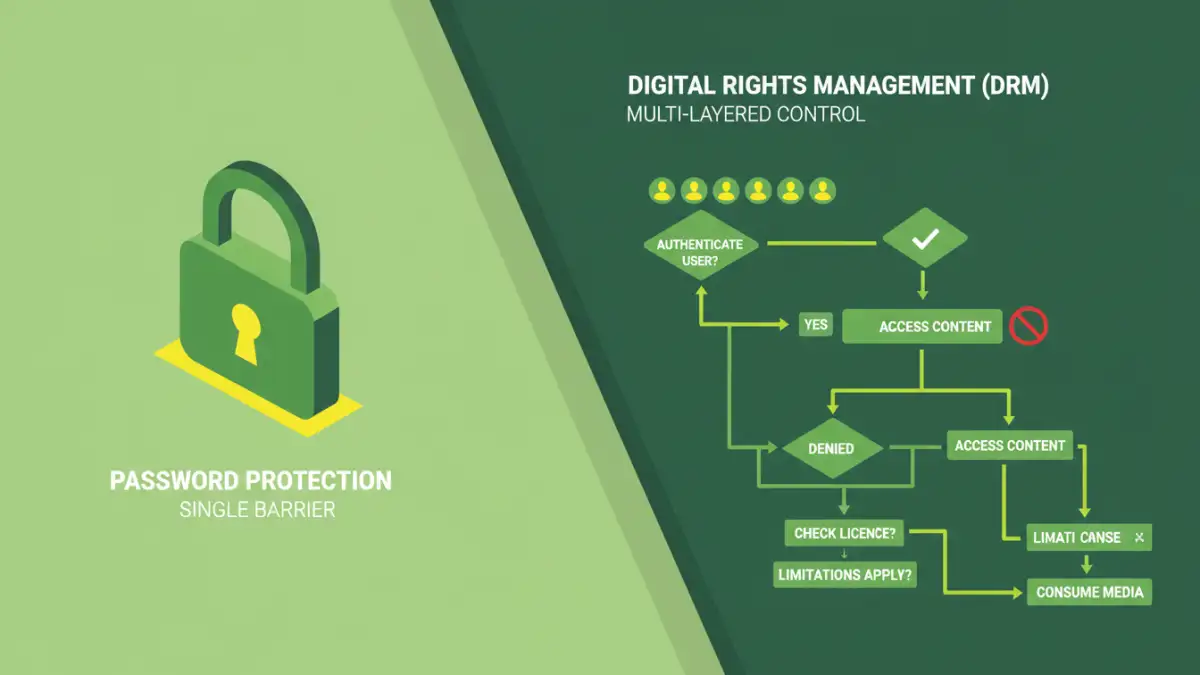
The main drawback of traditional password protection is its inherent simplicity. It relies entirely on the strength of the password chosen by the user and the security of the platform used to open the file. If the password is weak or guessed, or if the file is shared with someone who has the password, the protection is bypassed. There's no granular control over what a user can do once the file is opened; they can typically print, copy, or forward it freely.
Digital Rights Management (DRM)
DRM is a much more sophisticated and layered approach to content security. It's not just about locking a file; it's about managing how that file can be used, copied, or distributed after it's been accessed. DRM systems are often employed by publishers, media companies, and software vendors to protect intellectual property.
DRM Features
DRM can enforce a wide range of restrictions. These can include preventing printing, limiting the number of times a file can be opened, restricting copying and pasting, disabling screenshots, enforcing time limits for access, or even tying content access to specific devices or user accounts. Think of eBooks that can only be read on a specific e-reader or app, or music that can't be burned onto a CD or shared freely.
Implementation
DRM solutions typically involve embedding licensing information and encryption within the content itself, often requiring special software or hardware to access. This might be through a dedicated app, a secure player, or a licensing server that verifies the user's rights each time the content is accessed. This system is designed to be much harder to circumvent than a simple password.
Key Differences Summarized
The fundamental difference boils down to scope and control. Traditional password protection is a blunt instrument, securing the file itself. DRM is a finely tuned system for managing usage rights.
Granularity and Enforcement
Password protection offers binary access: either you have the password and full access, or you don't. DRM allows for fine-grained control over actions like printing, copying, or sharing, and can enforce these restrictions dynamically. This makes DRM suitable for scenarios where ongoing control over content usage is essential, such as subscription services or licensed software distribution.
Choosing the Right Method
The best choice between DRM and traditional password protection depends entirely on your specific needs and the type of content you're protecting.
When to Use Password Protection
If you need a simple way to prevent casual access to a document, like sharing a draft report internally where trust is high, traditional file password protection is usually sufficient. It's easy to implement, requires no special software for most users, and is quick to set up. It's ideal for basic privacy and ensuring that only intended recipients can open a file.
When to Consider DRM
DRM is the better choice when you need to maintain strict control over how content is used after distribution. This is common for commercial products like digital books, movies, music, or software licenses. If you need to prevent unauthorized copying, sharing, or specific types of interaction with your content, and you have the infrastructure to support it, DRM offers a far more robust solution. It provides a framework for managing intellectual property rights at scale.
Comparison Table
| Feature | Traditional Password Protection | Digital Rights Management (DRM) |
|---|---|---|
| Primary Goal | Restrict unauthorized opening of a file | Control usage rights and prevent specific actions (copying, printing, etc.) |
| Complexity | Simple, built-in features | Complex, often requires specialized software/services |
| Granularity of Control | None (all-or-nothing access) | High (can restrict printing, copying, sharing, device access, etc.) |
| Enforcement | Relies on user password strength and recipient's integrity | Dynamic, often enforced by software, hardware, or licensing servers |
| Use Cases | Internal documents, personal files, basic privacy | Copyrighted media (eBooks, music, video), software licensing, subscription content |
| Ease of Use (for user) | High (standard password prompt) | Can be lower (may require special apps, accounts) |
| Implementation Effort | Low | High |