
Sharing sensitive documents securely is a common challenge for many applications. Whether it's client contracts, financial reports, or proprietary research, ensuring that only authorized individuals can access these files is paramount. Over the years, I've seen many teams struggle with building custom solutions that are often complex and prone to security loopholes. Fortunately, leveraging a well-designed API can streamline this process significantly.
Table of Contents
Understanding Secure Document Sharing APIs
A secure document sharing API acts as a bridge, allowing your application to interact with a service that specializes in secure file management and distribution. Instead of building your own encryption, access control, and audit trail systems from scratch, you can utilize the robust infrastructure provided by an API. This approach saves development time and leverages the expertise of security professionals.
What is an API?
At its core, an API (Application Programming Interface) is a set of rules and protocols that allows different software applications to communicate with each other. In the context of document sharing, a secure document sharing API enables your app to upload, download, manage permissions, and track access to files hosted on a secure platform.
Key Features to Look For

When selecting a secure document sharing API, certain features are non-negotiable for robust document security. Prioritize APIs that offer end-to-end encryption, granular access controls, and comprehensive audit trails. These elements work together to ensure that your documents are protected at every stage.
Encryption Standards
Look for APIs that support strong encryption protocols, such as AES-256, both for data in transit (using TLS/SSL) and data at rest. This ensures that even if data is intercepted or the storage is compromised, the content remains unreadable to unauthorized parties. Strong encryption is the bedrock of secure file sharing.
Access Control and Permissions
The ability to define precisely who can access which documents and what actions they can perform (view, edit, download) is crucial. A good API will allow for role-based access control, user-specific permissions, and time-limited access links. This granular control prevents accidental oversharing.
Audit Trails and Logging
A comprehensive audit log records every action taken on a document – who accessed it, when, and what they did. This is vital for compliance, security monitoring, and accountability. Having detailed logs helps in identifying potential security breaches or policy violations quickly.
Step-by-Step API Integration
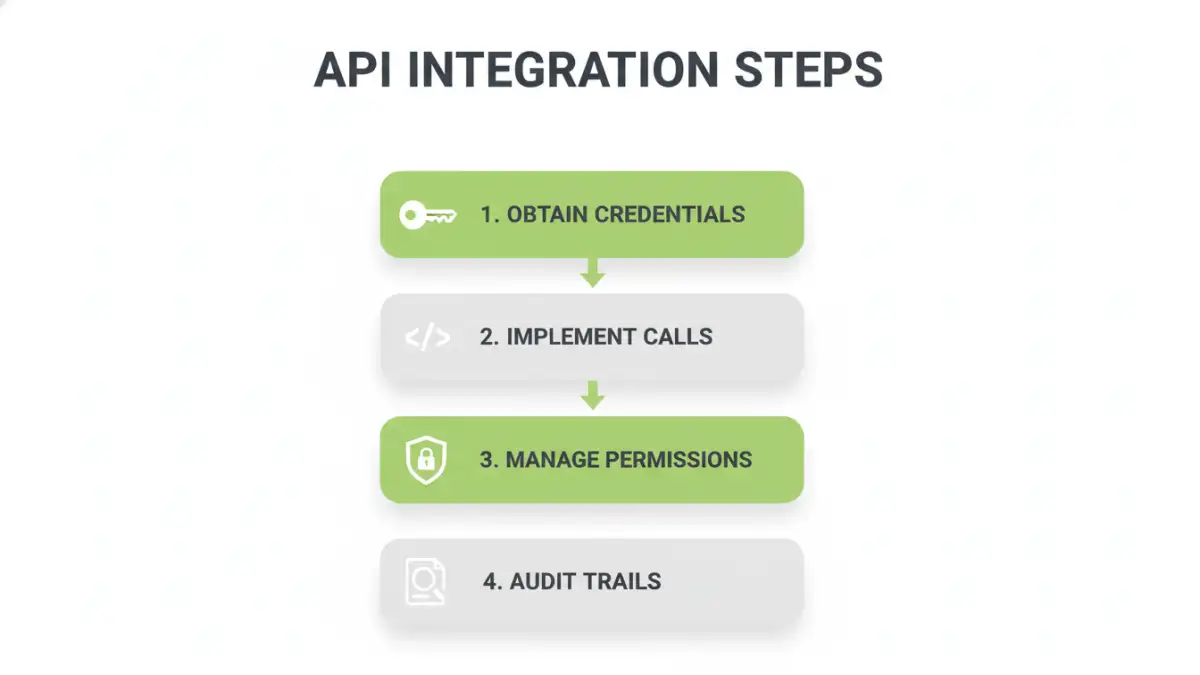
Integrating a secure document sharing API typically involves several key steps. While the specifics vary depending on the provider, the general process remains consistent. My experience suggests that thorough planning at this stage prevents many future headaches.
1. Choose an API Provider
Research and select a reputable API provider that meets your security, feature, and scalability requirements. Consider factors like pricing, documentation quality, and customer support. Some popular choices might offer specialized features for specific industries.
2. Obtain API Credentials
Once you've chosen a provider, you'll need to register your application and obtain API keys or tokens. These credentials authenticate your application when it makes requests to the API, ensuring that only authorized applications can access the service.
3. Implement API Calls
Using the provider's SDK (Software Development Kit) or making direct HTTP requests, implement the necessary API calls in your application. This includes functions for uploading files, setting permissions, retrieving file metadata, and downloading documents. Referencing the API documentation is key here.
4. Handle Responses and Errors
Your application should be designed to handle both successful API responses and potential errors gracefully. This includes parsing the data returned by the API and implementing logic to manage issues like authentication failures, file not found errors, or permission denied messages.
5. Test Thoroughly
Rigorous testing is essential. Test all aspects of the integration, including uploading, downloading, permission management, and error handling. Simulate various scenarios, including concurrent access and edge cases, to ensure the system is robust and secure.
Security Considerations and Best Practices
Beyond the features offered by the API itself, your implementation must adhere to security best practices. Neglecting these can undermine even the most secure API. Always think about the entire data lifecycle.
Secure Credential Management
Never hardcode API keys or secrets directly into your application's source code. Use environment variables, secure configuration files, or dedicated secrets management services to store and access your API credentials securely.
Input Validation
Always validate and sanitize any user-provided input that is used in API requests. This prevents common vulnerabilities like injection attacks. For example, when a user specifies a file ID, ensure it's a valid format before passing it to the API.
Rate Limiting and Throttling
Be mindful of API rate limits imposed by the provider. Implement appropriate error handling and retry mechanisms, possibly with exponential backoff, to avoid exceeding these limits, which can lead to temporary service disruptions or even account suspension.
Regularly Update Dependencies
If you're using SDKs or libraries provided by the API vendor, ensure they are kept up-to-date. Developers often release patches for security vulnerabilities, and staying current is crucial for maintaining a secure integration.
Real-World Use Cases
The applications for integrating a secure document sharing API are vast, spanning numerous industries and functional areas. Many solutions can benefit from enhanced document security and streamlined sharing workflows.
Client Portal Integration
Allowing clients to securely upload documents (like financial statements or legal documents) and access project-related files through a dedicated portal. This enhances client experience and ensures data privacy.
Internal Document Management
For businesses, integrating an API can create a centralized, secure repository for internal documents, such as HR policies, employee handbooks, or sensitive company data, with controlled access for different departments or roles.
Collaboration Tools
Enhancing team collaboration by providing a secure platform for sharing project documents, research papers, or creative assets, with version control and real-time access management.
Comparison Table
| Integration Method | Pros | Cons | Best For |
|---|---|---|---|
| Custom-Built Solution | Full control over features | High development cost, time-consuming, complex security management | Highly specific, unique requirements not met by off-the-shelf solutions |
| Third-Party API Integration | Faster development, leverages expert security, scalable | Dependency on provider, potential costs, less customization flexibility | Most standard document sharing needs, rapid deployment, cost-effectiveness |
| Embedding Existing Platforms | Leverages mature features, familiar UI | Limited integration depth, potential branding issues, reliance on platform changes | Quickly adding sharing to existing workflows without deep integration |