
Working with sensitive documents often brings a critical challenge: how do you ensure their confidentiality without adding friction to user workflows? For developers, the answer increasingly lies in automating security processes. Specifically, integrating a PDF encryption API into your applications allows you to programmatically secure documents, making data protection a seamless part of your software's functionality rather than a manual afterthought.
Over the years, I've seen firsthand how crucial it is to bake security into the core of an application. Relying on users to manually encrypt PDFs is a recipe for compliance issues and potential data breaches. That's why understanding how to effectively implement a robust API for encryption is so vital for modern software solutions dealing with sensitive information.
Table of Contents
Understanding PDF Encryption API Integration
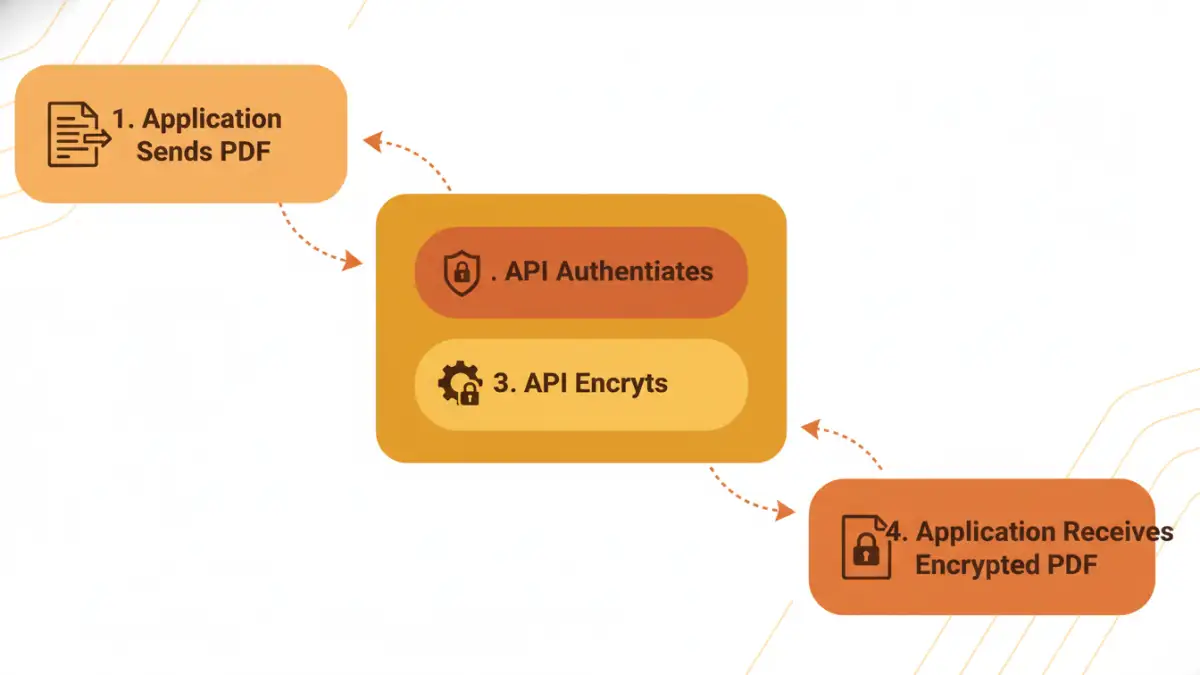
At its core, pdf encryption api integration means connecting your application to a third-party service that handles the cryptographic processes for securing PDF files. Instead of building complex encryption logic from scratch, you send your PDF data to the API, specify encryption parameters (like passwords or certificate-based encryption), and receive the encrypted PDF back. This dramatically simplifies development and ensures you're leveraging battle-tested security mechanisms.
The primary goal is to protect the content of your PDFs from unauthorized access. This can range from simple password protection to more sophisticated certificate-based encryption, which ties access to specific digital identities. The choice depends heavily on your application's security requirements and compliance obligations.
Why Encrypt PDFs Programmatically?
From a developer's perspective, programmatic encryption offers immense advantages. It ensures consistency across all documents processed by your system, eliminates human error in security application, and scales effortlessly with your application's growth. Imagine a system generating hundreds of invoices daily; manual encryption for each would be impractical and error-prone.
Moreover, automated encryption is often a non-negotiable requirement for compliance with regulations like GDPR, HIPAA, or various industry-specific data protection standards. Embedding this functionality directly into your application via a developer guide for an API for encryption streamlines adherence to these critical requirements.
Core Concepts of an API for Encryption
When you evaluate an API for encryption, you'll encounter a few fundamental concepts. Authentication is always first; you need to prove your application's identity to the API service, typically using API keys, OAuth tokens, or other credentials. Then, you'll work with endpoints designed for specific actions, like `encryptPdf`, `decryptPdf`, or `setPassword`.
Understanding the API's input and output formats is also key—usually, this involves sending PDF data as a byte stream or base64 encoded string and receiving the processed PDF in a similar fashion. Pay attention to the supported encryption algorithms (e.g., AES-128, AES-256) and how key management is handled, especially for certificate-based encryption.
Choosing the Right PDF Encryption API
The market offers several excellent PDF encryption API options, each with its strengths. My advice to teams is always to start by defining their specific use cases and non-negotiable security features. Do you need simple password protection, or advanced features like digital signatures and redaction? Price, scalability, and support are also significant factors.
I once worked on a project where we needed to secure PDFs with different permission levels for various user roles. The API we chose had to support granular control over printing, copying, and editing, which not all basic services offered. This kind of detailed requirement analysis is crucial before making a commitment.
Key Features to Look For
- Encryption Algorithms: Support for strong, modern algorithms like AES-256.
- Password Protection: Ability to set user and owner passwords, with varying permissions.
- Certificate-Based Encryption: For higher security, allowing encryption to specific public keys.
- Digital Signatures: Often bundled, allowing for verifiable document authenticity.
- Permissions Control: Granular control over printing, copying, modifying, and filling forms.
- Performance and Scalability: How quickly does it process files? Can it handle your anticipated load?
- SDKs and Documentation: Good SDKs and a comprehensive developer guide can significantly speed up your pdf encryption api integration.
- Compliance Certifications: Does the provider meet industry security standards (e.g., ISO 27001)?
Step-by-Step PDF Encryption API Integration
Integrating a PDF encryption API typically follows a predictable pattern, regardless of the specific provider. I usually break it down into a few core phases to ensure a smooth implementation process.
Authentication and Setup
The first step is always authentication. You'll sign up for the service, obtain your API keys or client credentials, and configure them in your application. Many APIs offer client libraries (SDKs) for popular programming languages (e.g., Python, Node.js, Java, .NET), which abstract away the raw HTTP requests and make authentication much simpler.
For instance, using an SDK, you might initialize a client object with your API key: const client = new SomePdfApi.Client('YOUR_API_KEY');. This setup is fundamental and ensures your application can securely communicate with the encryption service.
Implementing Encryption
Once authenticated, you'll make a call to the API's encryption endpoint. This usually involves:
- Reading the PDF: Load your PDF file into memory as a byte array or stream.
- Preparing Parameters: Define your encryption settings, such as the user password, owner password, and desired permissions (e.g., no printing, no copying).
- Making the API Call: Send the PDF data and parameters to the API.
- Handling the Response: The API will return the encrypted PDF data. You'll then save this data as a new, secure PDF file.
For example, a simplified code snippet might look like this:
async function encryptPdf(pdfBuffer, userPassword, ownerPassword) {
  const response = await client.encryptPdf({
    file: pdfBuffer,
    userPassword: userPassword,
    ownerPassword: ownerPassword,
    permissions: ['no_printing', 'no_copying']
  });
  return response.encryptedFile;
}
This illustrates the conceptual flow. Always refer to the specific API's developer guide for exact syntax and available options.
Best Practices and Advanced Considerations
Successfully integrating a pdf encryption api integration isn't just about making the API calls; it's also about building a robust, secure, and maintainable solution. These practices have served me well over many projects.
Security and Error Handling
Secure Key Management: Never hardcode passwords or API keys. Use environment variables, a secure vault, or a secrets management service. For certificate-based encryption, ensure your private keys are stored and accessed securely.
Robust Error Handling: APIs can fail for many reasons—network issues, invalid parameters, rate limits. Implement comprehensive error handling to gracefully manage these situations, inform users, and log details for debugging. Consider retry mechanisms for transient errors.
Input Validation: Before sending data to the API, validate your inputs. This prevents sending malformed PDFs or invalid encryption parameters, reducing errors and potential security vulnerabilities.
Regular Updates: Keep your API client libraries and SDKs up to date. Providers frequently release updates with performance improvements, new features, and crucial security patches. Staying current is vital for maintaining secure pdfs.
Performance Monitoring: Monitor the latency and success rates of your API calls. This helps identify bottlenecks or issues with the encryption service before they impact your users significantly.
Comparison Table
| Feature | Description | Importance for PDF Encryption API Integration |
|---|---|---|
| Authentication Methods | API Keys, OAuth 2.0, JWT tokens for securing API access. | Critical for ensuring only authorized applications can use the API for encryption, preventing misuse. |
| Encryption Algorithms | Supported cryptographic standards like AES-128, AES-256. | Determines the strength of the encryption; AES-256 is generally recommended for secure pdfs. |
| Key Management | How encryption keys are generated, stored, and managed (e.g., ephemeral, customer-managed). | Fundamental for security; poor key management can undermine strong encryption algorithms. |
| Permissions Control | Granular settings for user capabilities (print, copy, modify, fill forms). | Allows for fine-tuned access control, enhancing document security beyond simple password protection. |
| Scalability & Rate Limits | API's ability to handle high volumes of requests and any associated usage limits. | Ensures your application can grow without performance bottlenecks or unexpected service interruptions. |