When it comes to sharing sensitive information, ensuring its security is paramount. Whether you're sending confidential business documents, personal files, or proprietary data, you need a reliable method to prevent unauthorized access. Two common approaches come to mind: password protecting individual PDF files or bundling multiple files into a password-protected Zip archive. Each method has its strengths and weaknesses, and understanding them can help you choose the most appropriate solution for your needs.
In my years working with various file security protocols, I've seen firsthand how the choice between these two can impact usability, security, and even the recipient's experience. It's not just about slapping a password on something; it's about making an informed decision that balances protection with accessibility. Let's explore the nuances of password protected files when comparing the popular PDF and Zip formats.
Table of Contents
Understanding the Core Differences
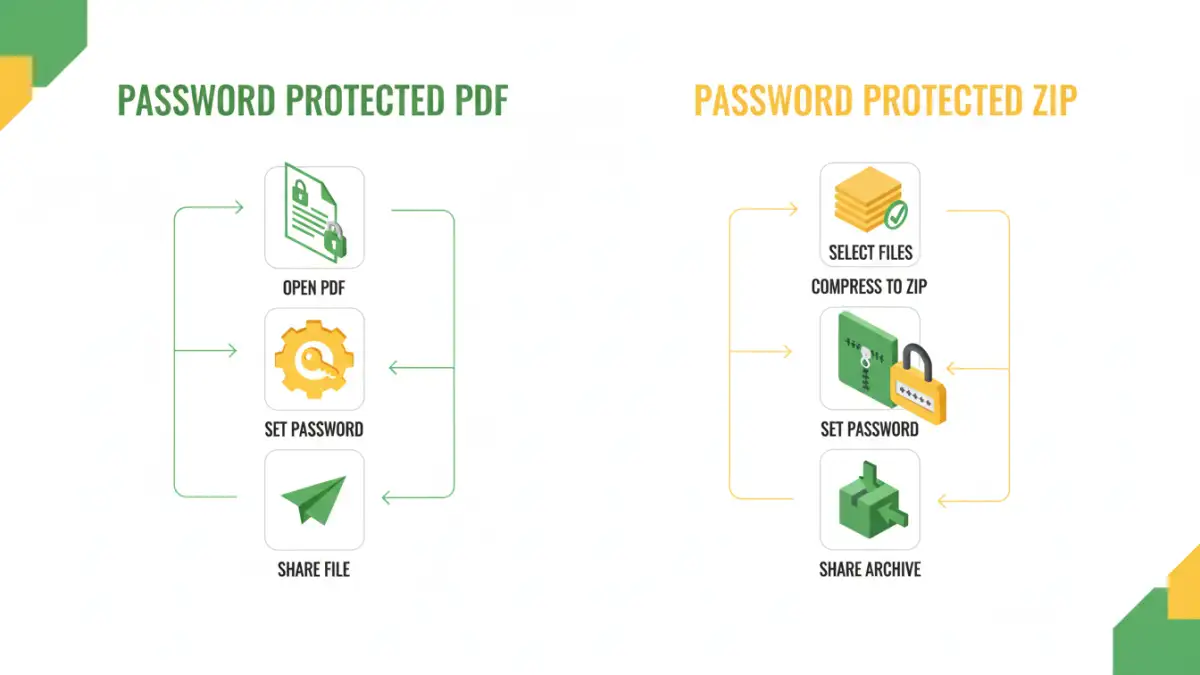
At their heart, both methods aim to encrypt file content and restrict access to those who possess the correct password. However, they operate at different levels and offer distinct features. A PDF, as a document format, can have its own built-in password protection. A Zip archive, on the other hand, is a container format used to compress and bundle one or more files, and this archive itself can be password protected.
The fundamental difference lies in scope. PDF protection is file-specific, securing the document itself. Zip protection is archive-specific, securing all the files contained within that archive. This distinction becomes crucial when deciding which method best suits the type and quantity of data you need to share securely.
Password Protecting PDFs
Protecting a PDF with a password is a straightforward process, often built directly into PDF reader and creation software like Adobe Acrobat, or even many free online tools. This method is ideal when you have a single document or a few related documents that you want to secure individually. It provides a layer of security against casual viewing or accidental sharing.
When you set a password for a PDF, you typically have options for different levels of protection. Some passwords restrict opening the document altogether, while others might allow viewing but prevent printing, copying text, or editing. This granular control can be very beneficial depending on your specific security requirements for that particular document.
When to Use PDF Protection
PDF protection is excellent for sharing a single report, a contract, or a presentation. If you're sending a resume or a sensitive invoice, adding a password directly to the PDF ensures that only the intended recipient, who has the password you've shared separately, can access its contents. This is particularly useful when you don't want to bundle multiple unrelated files together.
Password Protecting Zip Archives
Creating a password-protected Zip archive is a common method for bundling multiple files into a single, compressed package. This is incredibly useful when you need to send a collection of related documents, images, or even software components. The password protects the entire archive, meaning the recipient needs the password to extract any of the files within.
Most operating systems have built-in support for creating and extracting Zip files, and many offer password protection capabilities. Third-party archiving tools like WinRAR or 7-Zip offer more advanced encryption options, such as AES-256 encryption, which provides a higher level of security compared to older Zip encryption standards.
When to Use Zip Encryption
Zip encryption shines when you have a project folder, a set of design assets, or a collection of research papers to send. Instead of password-protecting each file individually, which can be time-consuming, you compress them all into one Zip file and protect the archive. This simplifies the sharing process for both sender and receiver, as they only need to manage one password for multiple files.
Key Comparison Factors
When considering the pdf vs zip password dilemma, several factors come into play. The primary difference often boils down to how the password is applied and the level of encryption offered. PDFs offer document-specific security, while Zip files provide container-level security.
For basic protection against casual access, both are effective. However, for stronger security, especially with sensitive data, the encryption strength matters. Older Zip encryption can be vulnerable, whereas modern Zip utilities and PDF software offer robust AES encryption. The ease of use for the recipient also varies; some may not have native tools to handle password-protected PDFs or Zip files with advanced encryption, requiring them to download specific software.
Best Practices for Secure File Sharing
Regardless of whether you choose a password-protected PDF or a Zip archive, certain best practices apply to secure file sharing. Always use strong, unique passwords that are difficult to guess. Avoid common words, sequential numbers, or personal information. It's also crucial to share the password separately from the file itself, perhaps via a different communication channel like a phone call or a secure messaging app.
Consider the sensitivity of your data and the technical proficiency of your recipient. For simple document sharing, a password-protected PDF might suffice. For bundling multiple files or when stronger encryption is needed, a Zip archive created with a robust encryption standard is often the better choice. Ultimately, the goal is to ensure your password protected files reach their intended audience securely and without unnecessary complications.
Comparison Table: PDF vs. Zip Protection
| Feature | Password Protected PDF | Password Protected Zip Archive |
|---|---|---|
| Scope of Protection | Individual document | Collection of files within an archive |
| Use Case | Single sensitive document (report, invoice, contract) | Bundling multiple related files (project assets, research papers) |
| Ease of Use (Sender) | Generally straightforward with built-in tools or free online services | Requires compression software, but widely supported |
| Ease of Use (Recipient) | Requires a compatible PDF reader; may need specific software for advanced protections | Requires extraction tool; widely supported by OS |
| Encryption Strength | Varies by software; can be strong (e.g., AES) | Varies by software; older methods weaker, modern ones strong (e.g., AES-256) |
| File Type Flexibility | Only protects PDF files | Can protect any file type within the archive |
| Password Management | Password for each PDF | Single password for all files in the archive |