
Working with password-protected documents can be frustrating, especially when you encounter an unreadable encrypted file. Whether it's a critical business report, personal photos, or financial records, losing access to encrypted data can be a significant setback. I've seen this happen more times than I can count – a moment of forgotten password, a corrupted file, or an outdated encryption method can lock you out of your own information.
The good news is that for many situations, there are viable options to recover or repair these files. It's not always a lost cause. Understanding the nature of the encryption and the potential causes of inaccessibility is the first step towards a successful recovery.
Table of Contents
Understanding Encryption Issues
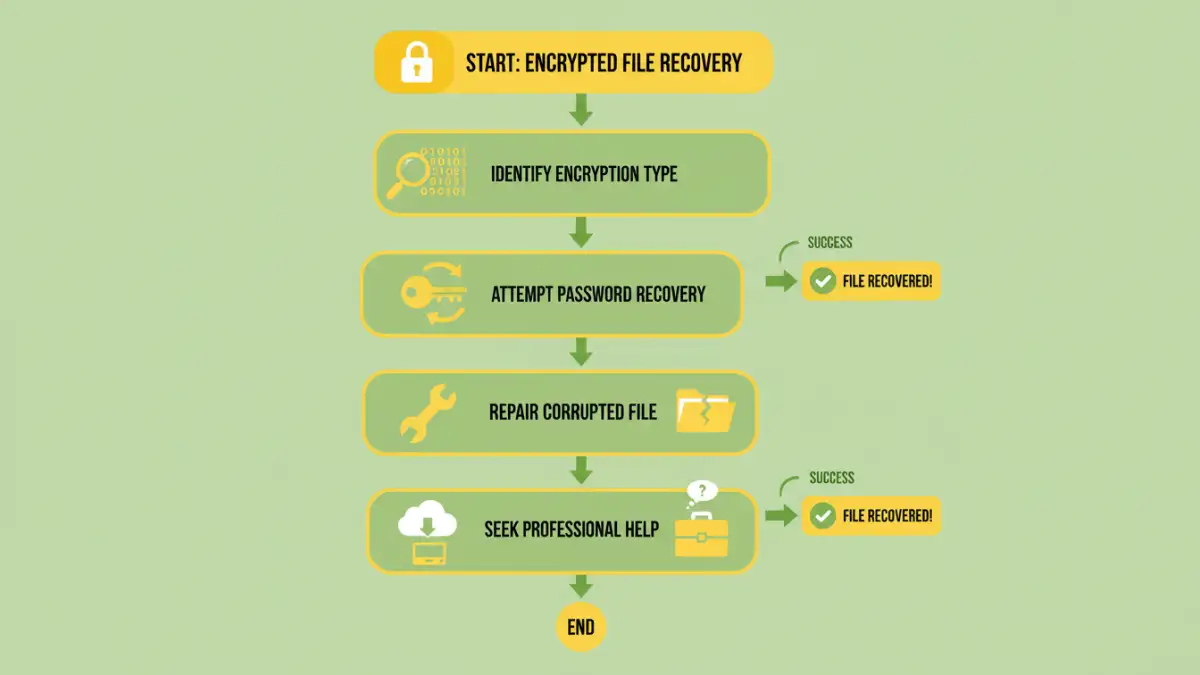
Encryption is a powerful tool for file security, but it relies on precise keys – typically passwords or cryptographic keys – to unlock the data. When a file becomes unreadable, it usually means one of two things: either the encryption itself is compromised, or the method used to decrypt it is no longer compatible.
Types of Encryption
Different software and operating systems use various encryption algorithms. Some common examples include AES (Advanced Encryption Standard), which is widely used for its robustness, and proprietary methods embedded in specific applications like Microsoft's EFS (Encrypting File System) or macOS's FileVault. Understanding which type of encryption is at play can sometimes guide the recovery process.
Common Causes of Inaccessibility

Several factors can lead to an encrypted file becoming unreadable. The most frequent culprit is a forgotten or incorrectly entered password. If the password is wrong, the decryption process will fail, making the file appear corrupted or inaccessible.
Beyond password issues, file corruption is another major cause. This can happen due to storage media failure, incomplete file transfers, software glitches during the encryption/decryption process, or malware. In such cases, the encrypted data itself might be damaged, making recovery more challenging.
Recovery Methods and Tools
When faced with an unreadable encrypted file, the approach to recover encrypted file depends heavily on the cause. If you simply forgot the password, brute-force tools or password recovery software might be an option for less complex encryption, though success is not guaranteed and can be time-consuming.
For corrupted encrypted files, data recovery software designed to repair damaged file structures can sometimes help. These tools scan the file for intact data segments and attempt to reconstruct a usable version. It's crucial to use reputable software and, if possible, work on a copy of the file to avoid further data loss.
In some professional scenarios, specialized data recovery services exist. These experts have advanced tools and techniques to handle severely damaged or complex encrypted files. While often more expensive, they can be the last resort for critically important data.
Preventative Measures
The best strategy against unreadable encrypted files is prevention. Always use strong, memorable passwords for your encrypted files and store them securely, perhaps using a reputable password manager. Keep backups of your important encrypted files in multiple locations, including offline storage.
Additionally, ensure that the encryption software you use is up-to-date and compatible with your operating system. Avoid using outdated or obscure encryption methods that might become obsolete or unsupported. Regularly testing your backups is also a critical step to ensure you can access your data when needed.
Comparison Table: Encryption Recovery Approaches
| Method | Description | Pros | Cons | Best For |
|---|---|---|---|---|
| Password Recovery Tools | Attempts to guess or brute-force the password. | Can recover files with forgotten passwords. | Time-consuming, may not work for strong passwords, potential for data alteration if not careful. | Simple password encryption, personal use. |
| File Repair Software | Scans and reconstructs damaged file structures. | Can fix corrupted encrypted files. | May not recover all data, requires specific software. | Corrupted encrypted files. |
| Professional Data Recovery Services | Expert technicians with advanced tools. | Highest chance of recovery for severe issues. | Expensive, time-consuming. | Critical data, severely damaged or complex encryption. |
| Backup Restoration | Restoring from a previous saved copy. | Simplest and most reliable if backups exist. | Requires prior backup, data might be slightly outdated. | Any scenario where recent backups are available. |
Extra tips before you try to recover encrypted file
First, confirm what kind of protection you are dealing with. Some PDFs require a password to open (user password), while others only restrict printing/copying/editing (owner password). The safest approach depends on which one you have.
For sensitive documents, prefer offline tools and avoid uploading confidential files to unknown websites. If you must use an online tool, read the privacy policy and delete uploaded files immediately after processing.
- Try a different PDF viewer (some apps cache old permissions)
- Re-download the file (corruption can cause false password errors)
- Check caps lock / keyboard layout for password entry
- Differentiate “permission password” vs “open password” prompts
- If it is not your file, request access from the owner