When dealing with sensitive information, understanding potential threats and vulnerabilities is paramount. A robust document security risk assessment isn't just a compliance checkbox; it's a critical process for safeguarding confidential data, intellectual property, and customer trust.
Without a systematic approach, organizations can overlook critical weaknesses, leaving them exposed to data breaches, regulatory fines, and reputational damage. This guide breaks down the process into actionable steps, helping you build a strong defense for your digital assets.
Table of Contents
Understanding the Basics
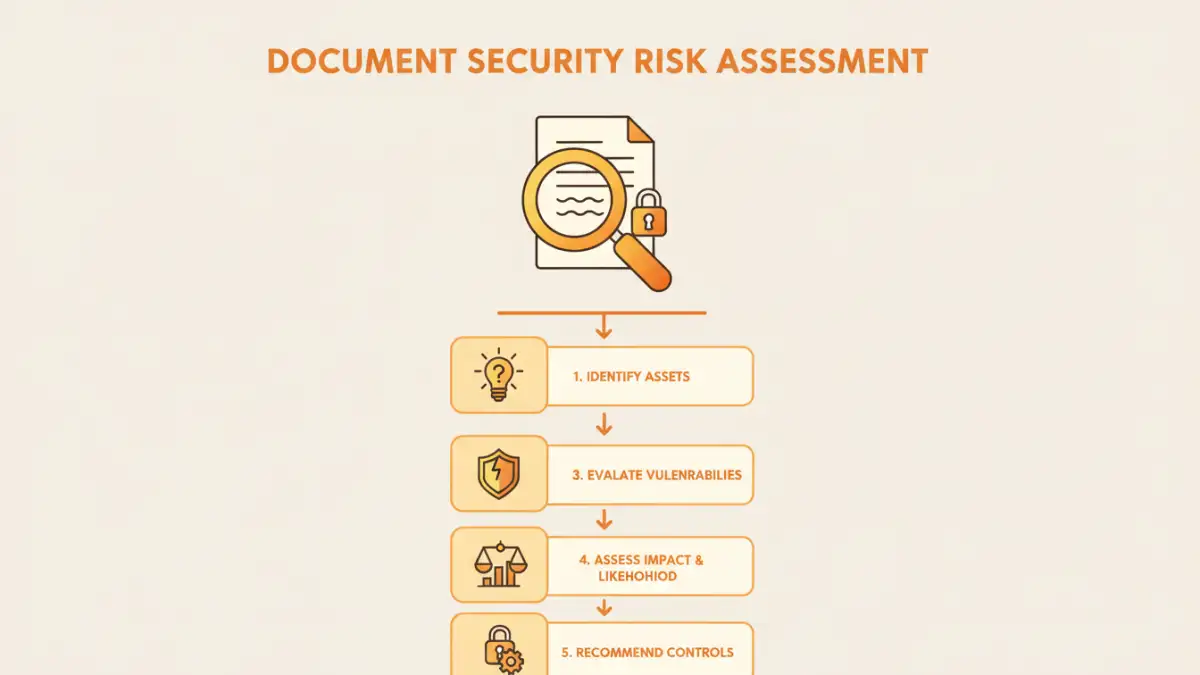
At its core, a document security assessment involves identifying what needs protecting, what the threats are, and how likely those threats are to succeed. It's about understanding your digital landscape and proactively mitigating potential harm. This process helps move beyond reactive security measures to a more strategic, preventative stance.
Key Concepts in Document Security
Before diving into the steps, it's important to grasp a few key terms. Assets are the valuable information you need to protect, such as financial records, customer lists, or proprietary designs. Threats are potential dangers, like malware, phishing attacks, or unauthorized access. Vulnerabilities are weaknesses in your systems or processes that threats can exploit.
Step 1: Identify Assets and Threats

The first phase of any effective document security assessment is a comprehensive inventory. What documents and data are critical to your operations? This includes everything from physical files to digital records stored on servers, cloud services, or employee devices. Categorize these assets by sensitivity and business impact.
Next, brainstorm potential threats relevant to your organization. Consider both internal and external threats. Internal threats might include accidental data deletion by employees or malicious insider activity. External threats encompass cyberattacks, natural disasters, and hardware failures. A thorough threat landscape analysis is crucial.
Step 2: Analyze Risks and Vulnerabilities
With your assets and threats identified, the next step is to connect them. Where are the vulnerabilities that could allow a threat to compromise an asset? For example, a lack of encryption on a server storing financial reports represents a vulnerability. An unpatched operating system on a workstation accessing sensitive customer data is another.
Analyze the likelihood of each identified threat exploiting a specific vulnerability. This involves considering factors like the prevalence of the threat, the effectiveness of existing security measures, and the ease with which a vulnerability can be exploited. This analysis forms the basis for understanding your overall risk exposure.
Step 3: Evaluate and Prioritize Risks
Not all risks are created equal. Once you've analyzed the likelihood of threats exploiting vulnerabilities, you need to evaluate the potential impact. What would be the consequences if a particular asset were compromised? This could range from minor inconvenience to severe financial loss or legal repercussions.
By combining the likelihood of a risk occurring with the potential impact, you can assign a risk level (e.g., low, medium, high, critical). This prioritization is essential for allocating resources effectively. Focus your mitigation efforts on the highest-priority risks first, ensuring the most critical areas are adequately protected.
Step 4: Plan and Implement Controls
This is where you define and put into action measures to reduce or eliminate identified risks. Controls can be technical, administrative, or physical. Technical controls include things like firewalls, antivirus software, and encryption. Administrative controls involve policies and procedures, such as access management protocols and data handling guidelines.
Develop a clear plan outlining the specific controls to be implemented for each prioritized risk. Assign responsibility for implementing these controls and set realistic timelines. It’s important to choose controls that are appropriate for the risk level and feasible within your operational context. A comprehensive data security plan will detail these measures.
Step 5: Monitor and Review
Document security is not a one-time task. The threat landscape and your organization's operations are constantly evolving. Therefore, continuous monitoring and regular reviews are vital. This involves tracking the effectiveness of implemented controls, staying informed about new threats, and periodically re-evaluating your risk assessment.
Schedule regular security audits to identify any new vulnerabilities or gaps. Track key security metrics and incident reports to understand trends. This iterative process ensures your security posture remains strong and adaptable to emerging challenges, making your overall document security assessment a living, breathing process.
Best Practices for Ongoing Security
Beyond the formal assessment steps, embedding security into your organizational culture is key. Train employees on security policies and best practices. Implement the principle of least privilege, ensuring users only have access to the data they absolutely need. Regularly update software and systems to patch known vulnerabilities.
Consider implementing multi-factor authentication (MFA) for accessing sensitive documents. Establish clear data retention and disposal policies to minimize the amount of sensitive data you hold. Foster an environment where security concerns can be reported without fear of reprisal.
Comparison Table: Document Security Control Methods
| Control Method | Description | Pros | Cons | Use Case Example |
|---|---|---|---|---|
| Access Control Lists (ACLs) | Defines permissions for users/groups on files/folders. | Granular control, standard on most OS. | Can be complex to manage at scale. | Restricting access to HR records. |
| Encryption (At Rest) | Scrambles data stored on drives/servers. | Protects data even if physical media is stolen. | Requires key management, can impact performance. | Securing sensitive client databases. |
| Encryption (In Transit) | Scrambles data as it moves across networks. | Prevents eavesdropping during transmission. | Requires secure protocols (e.g., HTTPS, SFTP). | Sending confidential files via email (using TLS). |
| Data Loss Prevention (DLP) | Monitors and prevents sensitive data from leaving the organization. | Automates detection and blocking of data exfiltration. | Can have false positives/negatives, requires configuration. | Preventing accidental sharing of PII. |
| User Training & Awareness | Educating employees on security risks and policies. | Addresses human error, builds a security-conscious culture. | Effectiveness varies, requires continuous reinforcement. | Phishing awareness campaigns. |