Working with sensitive documents in a business environment often involves a critical step: encryption. Whether it's client contracts, financial reports, or proprietary research, ensuring this data remains confidential is paramount. The manual process of encrypting files, especially in large volumes or across multiple teams, can be tedious, error-prone, and a significant bottleneck in daily operations. This is where the power of automation can truly transform how we handle document security.
Over the years, I've seen firsthand how manual encryption can lead to delays and security lapses. A colleague once spent an entire afternoon manually encrypting a batch of client proposals, only to realize later that a few were missed, creating a potential security risk. It became clear that a more robust, automated solution was needed. This experience, among many others, highlights the need for smarter ways to manage file security.
Table of Contents
Understanding Workflow Automation for Encryption
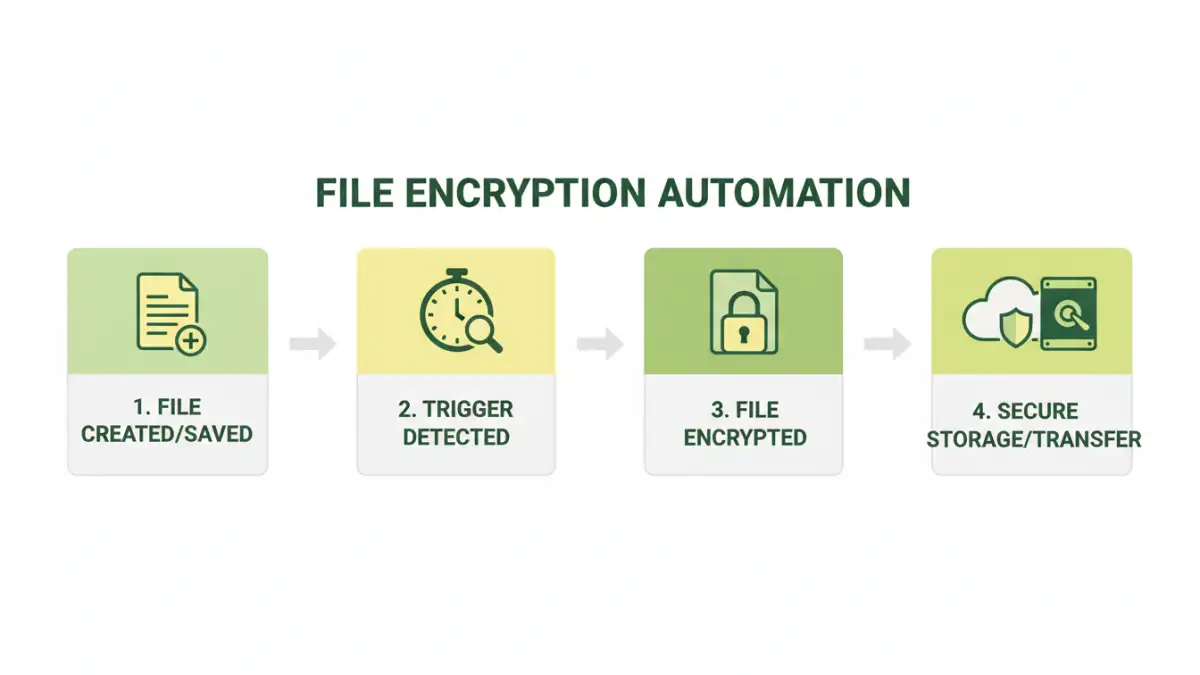
Workflow automation, in essence, is about using technology to manage and execute business processes with minimal human intervention. When applied to file encryption, it means setting up systems that automatically encrypt files based on predefined rules or triggers. This could involve encrypting files as soon as they are saved to a specific folder, uploaded to a cloud service, or sent as part of an email attachment. The goal is to make the security process seamless and integrated into the existing workflow.
This approach removes the human element of forgetting or incorrectly applying encryption. Instead, a reliable system ensures that every sensitive file is protected according to company policy. It’s about building security into the very fabric of your digital operations, rather than treating it as an afterthought.
Core Components of an Automated System
A robust file encryption automation system typically involves several key components. This includes a mechanism to detect files requiring encryption (e.g., monitoring specific directories or file types), an encryption engine (software that performs the actual encryption using algorithms like AES-256), and a method for managing encryption keys securely. Automation tools can orchestrate these components, ensuring that files are encrypted and decrypted only by authorized users or systems, often integrated with access control mechanisms.
Key Benefits of Automating Encryption

The advantages of automating file encryption extend far beyond just saving time. One of the most significant benefits is the drastic reduction in human error. Manual processes are susceptible to mistakes, such as forgetting to encrypt a file, using weak passwords, or mismanaging encryption keys. Automation ensures consistency and adherence to security protocols every single time.
Furthermore, automating file encryption significantly enhances the speed and efficiency of data handling. Instead of employees spending valuable time on manual encryption tasks, they can focus on more strategic work. This also speeds up the secure file transfer automation process, ensuring that sensitive data reaches its destination without unnecessary delays or security vulnerabilities.
Enhanced Security and Compliance
Automated workflows ensure that encryption policies are consistently applied across all files and users, significantly strengthening your overall security posture. This is crucial for meeting stringent regulatory compliance requirements, such as GDPR, HIPAA, or CCPA, which mandate the protection of sensitive data. By automating the document protection workflow, organizations can demonstrate due diligence and avoid hefty fines associated with data breaches.
Methods for Implementing File Encryption Automation
There are several ways to implement file encryption automation, catering to different needs and technical capabilities. For simpler needs, many cloud storage services and operating systems offer built-in encryption features that can be configured to work automatically. For example, certain cloud platforms can encrypt files upon upload, or operating systems can encrypt entire drives.
More sophisticated solutions involve dedicated workflow automation tools or scripting. These can integrate with various applications and services to create custom encryption workflows. For instance, you might use a tool like Microsoft Power Automate or Zapier to trigger encryption actions based on file events in cloud storage or email. For enterprise-level needs, specialized data loss prevention (DLP) software often includes robust file encryption automation capabilities.
Using Scripting for Custom Solutions
For those with programming skills, scripting offers a highly flexible approach. Languages like Python can be used with libraries like `pyAesCrypt` or `cryptography` to create custom scripts. These scripts can monitor folders, detect new files, encrypt them with a strong algorithm, and manage keys. This method is ideal for unique or complex workflows where off-the-shelf solutions fall short.
For example, a Python script could be set up to watch a specific directory. When a new `.docx` file is added, the script automatically encrypts it using AES-256 and renames it with a `.docx.aes` extension. The decryption key could be stored securely or managed through a separate secure process. This allows for precise control over the entire file encryption automation process.
Best Practices for Secure Workflows
When implementing file encryption automation, it’s vital to follow best practices to ensure maximum security and efficiency. Firstly, always use strong, industry-standard encryption algorithms like AES-256. Avoid outdated or proprietary encryption methods. Secondly, robust key management is critical. Encryption keys are the master keys to your data; they must be stored securely, access to them must be strictly controlled, and rotation policies should be in place.
Another crucial aspect is regularly auditing your automated encryption processes. Ensure that the system is functioning as expected, that all intended files are being encrypted, and that access logs are being maintained. This helps in identifying any potential security gaps or system malfunctions promptly. Implementing a clear document protection workflow that outlines responsibilities and procedures is also essential for team-wide adoption and understanding.
Comparison Table: Encryption Automation Methods
| Method | Complexity | Cost | Flexibility | Security Level | Use Case Example |
|---|---|---|---|---|---|
| Built-in OS/Cloud Features | Low | Free | Low | Good | Encrypting personal files on a laptop or cloud storage |
| Workflow Automation Tools (e.g., Zapier, Power Automate) | Medium | Subscription-based | Medium | Very Good | Automatically encrypting and sending invoices via email |
| Dedicated DLP/Encryption Software | High | High (Enterprise) | High | Excellent | Enterprise-wide compliance and data protection |
| Custom Scripting (e.g., Python) | High | Low (development time) | Very High | Excellent | Specific, unique workflow requirements for sensitive R&D data |
Choosing the right method for file encryption automation depends heavily on your specific needs, technical resources, and budget. For individuals or small teams, built-in features or simple workflow tools might suffice. Larger organizations with complex compliance requirements will likely benefit from dedicated software or custom scripting for tailored solutions. Regardless of the chosen method, a focus on strong encryption and secure key management is non-negotiable for effective document protection workflow.