In an era where data breaches are becoming alarmingly common, ensuring the security of sensitive documents is paramount. Whether you're a business professional sharing confidential reports, a developer distributing code, or simply managing personal records, the need to protect information from unauthorized access has never been more critical. This is especially true when dealing with large collections of files that might be stored across multiple segments, often referred to as multi-part archives.
Over my career, I've seen firsthand the importance of robust security measures. I've guided teams in implementing secure data handling protocols, and a key component often involves effective archive encryption. Properly securing these archives means that even if the files are intercepted, their contents remain unreadable without the correct key.
Table of Contents
Understanding Multi-Part Archives and Encryption
Multi-part archives, often created with tools like 7-Zip or WinRAR, are essentially large files split into smaller, more manageable segments. This is typically done for easier transfer over networks with size limits, or for storage on multiple removable media. While convenient, the fragmentation means that the entire archive's integrity and security depend on the protection applied to each part.
Encryption, in this context, transforms your readable data into an unreadable format using a complex algorithm and a secret key or password. Only with the correct key can the data be decrypted and accessed. For multi-part archives, this means applying strong encryption to the entire archive during its creation, ensuring all segments are protected.
Why Encrypt Multi-Part Archives?
The primary reason to encrypt multi-part archive files is to safeguard sensitive information. Imagine sending a large project folder containing intellectual property or client data. If this archive isn't encrypted and falls into the wrong hands during transmission or storage, it could lead to significant data breaches and compliance issues.
Beyond preventing unauthorized access, encryption also provides a layer of integrity. Many archiving tools integrate checksums with encryption, which helps verify that the archive hasn't been tampered with. This dual protection ensures both confidentiality and a degree of authenticity for your secure file archives.
Choosing the Right Tools and Methods
Selecting the appropriate software is crucial for effective archive encryption. Not all archiving tools offer the same level of security or ease of use. It’s important to opt for solutions that employ industry-standard encryption algorithms like AES-256, which is widely recognized for its robustness.
Consider features such as strong password generation, key file support, and the ability to encrypt filenames as well as content. These capabilities significantly enhance the security posture of your document encryption efforts, making it much harder for attackers to even guess what's inside.
Popular Archiving Software
Several well-regarded tools can handle multi-part archives and provide robust encryption. 7-Zip is a free, open-source option known for its high compression ratios and strong AES-256 encryption. WinRAR is another popular choice, offering excellent features for splitting and encrypting archives, though it is a commercial product.
Both tools allow you to create multi-part archives (often called "volumes") and apply a password-based encryption scheme during the creation process. This ensures that each segment of your secure file archives is individually protected, even if separated from the others.
Step-by-Step Encryption Process
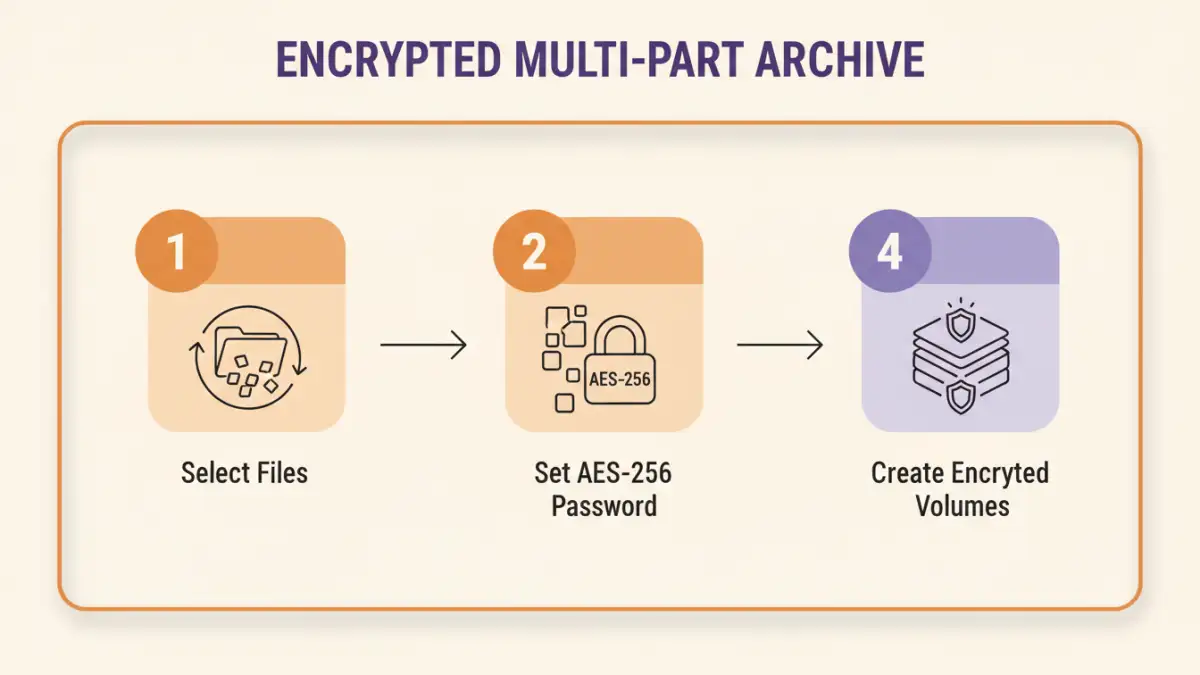
The general process to encrypt multi part archive files involves selecting the files you want to archive, initiating the archive creation, specifying the split size for multi-part volumes, and most importantly, setting a strong password and choosing an encryption method. This ensures that the entire package, regardless of its segmentation, is protected from the outset.
Encrypting with 7-Zip
Using 7-Zip, the process is straightforward. First, select the files and folders you wish to archive. Right-click, go to '7-Zip', and select 'Add to archive...'. In the 'Add to Archive' dialog, you'll find options to specify the 'Split to volumes, bytes' setting to create multi-part archives.
Crucially, in the 'Encryption' section, enter a strong password twice and select 'AES-256' for the encryption method. You can also check 'Encrypt file names' for an added layer of privacy. Click 'OK', and 7-Zip will create your encrypted multi-part archive.
Using WinRAR for Secure Archives
WinRAR offers a similar, intuitive interface. Select your files, right-click, and choose 'Add to archive...'. In the 'Archive name and parameters' dialog, you can define the 'Split to volumes, bytes' to create the multi-part structure. Navigate to the 'General' tab and click 'Set password...'.
Here, enter your password, confirm it, and ensure 'Encrypt file names' is checked for enhanced security. WinRAR typically uses AES-256 by default for its encryption. After setting the password, click 'OK' on both dialogs to generate your secure, multi-part archive.
Best Practices for Archive Security
Beyond the technical steps, maintaining strong security habits is paramount. Always use robust, unique passwords for your encrypted archives. Avoid common words or easily guessable sequences; instead, opt for long, complex passphrases that combine letters, numbers, and symbols.
Regularly update your archiving software to benefit from the latest security patches and improvements. When sharing these secure file archives, use secure channels, and transmit the password separately, perhaps via a different communication method. This split knowledge approach significantly reduces the risk of simultaneous interception.
Consider using a reputable password manager to generate and store your archive passwords securely. This not only helps you create truly strong passwords but also manages them efficiently without the need to remember each one. Implementing these practices will significantly bolster your overall document encryption strategy.
Comparison Table: Archiving Tools for Secure Multi-Part Archives
| Feature/Tool | 7-Zip | WinRAR | Built-in OS (e.g., macOS Archive Utility) |
|---|---|---|---|
| Encryption Algorithm | AES-256 | AES-256 | Varies (often AES-128/256 for ZIP) |
| Multi-Part Archiving | Yes | Yes | Limited/No direct support |
| Encrypt Filenames | Yes | Yes | No (for standard ZIP) |
| Password Strength | Strong (user-defined) | Strong (user-defined) | Strong (user-defined) |
| Cost | Free, Open Source | Commercial (trial available) | Free (included with OS) |
| Cross-Platform | Windows, Linux, macOS (via ports) | Windows, macOS, Linux (CLI) | OS-specific |
| Best For | Maximum compression & security, budget-conscious | Advanced features, robust recovery, Windows users | Basic, quick archiving without advanced security needs |