When dealing with sensitive information, the integrity and security of your files are paramount. Whether you're a professional archiving important client data or an individual safeguarding personal memories, ensuring your digital assets remain protected from unauthorized access and corruption is a constant concern. Often, the simplest solutions offer the most robust protection, and understanding how to break down large or sensitive files into smaller, more manageable, and secure chunks is a fundamental skill.
For years, I've relied on various methods to secure and transfer files, especially when dealing with volumes of data that exceed typical email limits or require an extra layer of protection. One technique that consistently proves effective is the use of multi-part archives. This approach not only helps in managing large files but also significantly bolsters secure file storage by allowing for encryption and distribution across different locations or media.
Table of Contents
Understanding Multi-Part Archives
At its core, a multi-part archive is simply a large file that has been split into several smaller files, often referred to as 'parts' or 'volumes'. This splitting is typically done using archiving software, which then allows you to reassemble the original file by joining these parts back together. This method is particularly useful for breaking down very large files that might be difficult to transfer or store as a single unit.
Key Concepts
The primary benefit of splitting a file into parts is to overcome limitations imposed by file transfer protocols, email attachment sizes, or storage media capacities. Each part is a distinct file, but they are designed to be used in sequence to reconstruct the original data. This is a cornerstone of effective large file management.
Why Use Multi-Part Archives?

Beyond just managing size, multi-part archives offer significant advantages for secure file storage. When you create an archive, you can often apply strong encryption to the entire collection of parts. This means that even if one part is intercepted or accessed, the data remains unreadable without the correct decryption key or password. This layered approach provides robust document archive best practices.
Furthermore, distributing parts across different storage locations – such as multiple USB drives, cloud storage services, or even different servers – can add a layer of redundancy. If one storage medium fails or one part becomes corrupted, you still have the other parts to reconstruct the majority, if not all, of your data.
Creating Multi-Part Archives
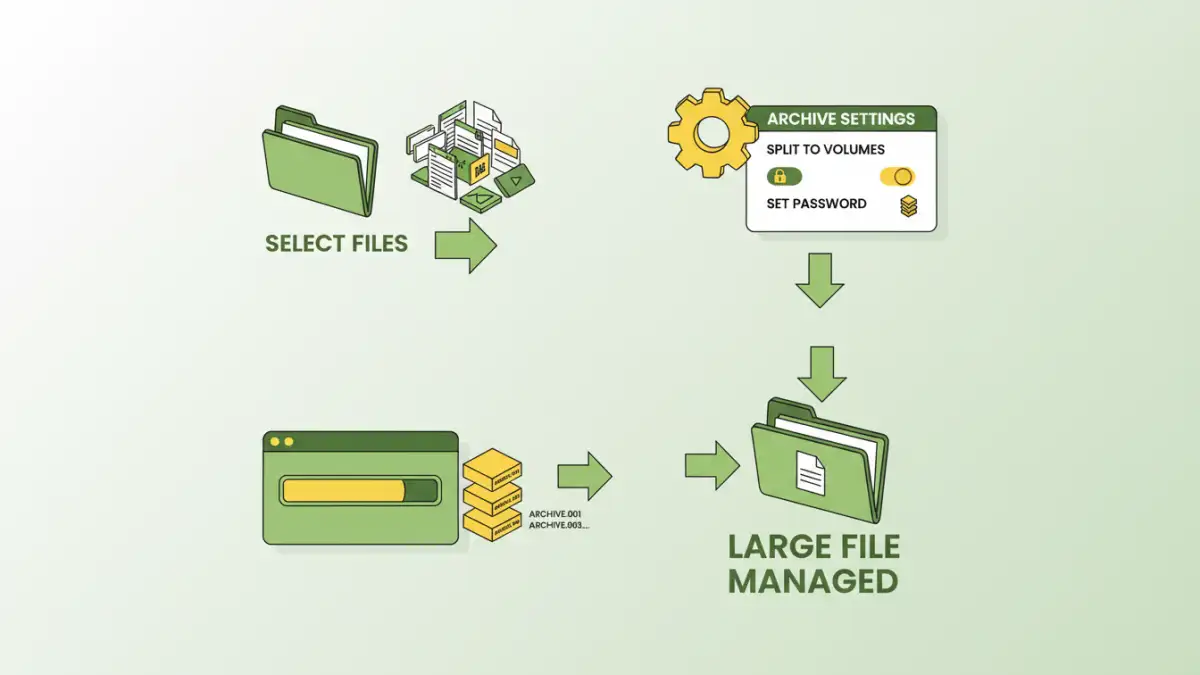
Creating multi-part archives is a straightforward process with most modern archiving tools. Software like 7-Zip, WinRAR, or even built-in utilities in some operating systems can handle this. The process typically involves selecting the files you want to archive, choosing an archive format (like .7z or .rar), and then specifying the desired volume size or the number of parts you want to split the archive into.
Step-by-Step with 7-Zip
For example, using 7-Zip (a free and open-source tool), you would select your files, right-click, choose '7-Zip' > 'Add to archive...'. In the dialog box that appears, you can select your desired compression level and format. Crucially, there's an option labeled 'Split to volumes, bytes:'. Here, you can enter a size (e.g., '4480M' for 4480 megabytes, a common size for DVD-R media) or choose from predefined sizes. This automatically creates a series of files (e.g., archive.7z.001, archive.7z.002, etc.).
Advanced Security Features
Most archiving software allows you to set a password during the archive creation process. This password is used to encrypt the contents of the archive. When creating multi-part archives, this password applies to all the generated parts. For maximum security, choose a strong, unique password and consider using robust encryption algorithms like AES-256, which is supported by many popular tools.
The ability to split and encrypt simultaneously makes multi-part archives a powerful tool for anyone needing to protect sensitive data. It’s a practical method that balances security with manageability, especially when dealing with large datasets or when compliance with document archive best practices is required.
Best Practices for Storage
When implementing multi-part archive storage, several best practices can enhance your security and usability. Always ensure you have a reliable method for storing the individual parts. If you're splitting a file for backup, keep the parts in different physical locations or secure cloud storage. This protects against data loss due to hardware failure or physical damage.
Crucially, keep a secure record of your password. Losing the password means losing access to your data permanently, as there's typically no recovery mechanism for strong encryption. Using a reputable password manager is highly recommended for this purpose. Also, test your archives periodically by extracting them to ensure all parts are intact and the password still works.
Comparison Table: Archiving Methods
| Method | Pros | Cons | Use Case |
|---|---|---|---|
| Single Large Archive | Simple to create and manage for smaller files | Difficult to transfer large files, single point of failure if corrupted | Small documents, single files |
| Multi-Part Archives | Manages large files, distributable, encryptable | Requires software to split/join, need all parts for extraction | Large datasets, secure transfer, backups |
| Cloud Storage Sync | Automatic, accessible from anywhere, versioning | Internet dependent, potential privacy concerns, subscription costs | Collaboration, real-time access |
| Physical Media (USB/HDD) | Offline, portable | Susceptible to physical damage, data degradation over time | Local backups, offline archiving |