
When dealing with massive datasets, the typical graphical interfaces often buckle under the strain. I've frequently encountered situations where a log file, a configuration dump, or a large dataset exceeds gigabytes in size. Trying to open these in a standard text editor can lead to system hangs or outright crashes. Fortunately, the command line offers a robust and surprisingly efficient suite of tools perfect for this kind of challenge.
These powerful utilities allow us to inspect, filter, transform, and analyze data without loading the entire file into memory. This approach not only saves system resources but also enables complex operations that would be cumbersome or impossible with GUI-based editors. Mastering these command line text tools is a fundamental skill for anyone working with significant amounts of text data.
Table of Contents
Understanding the Challenges
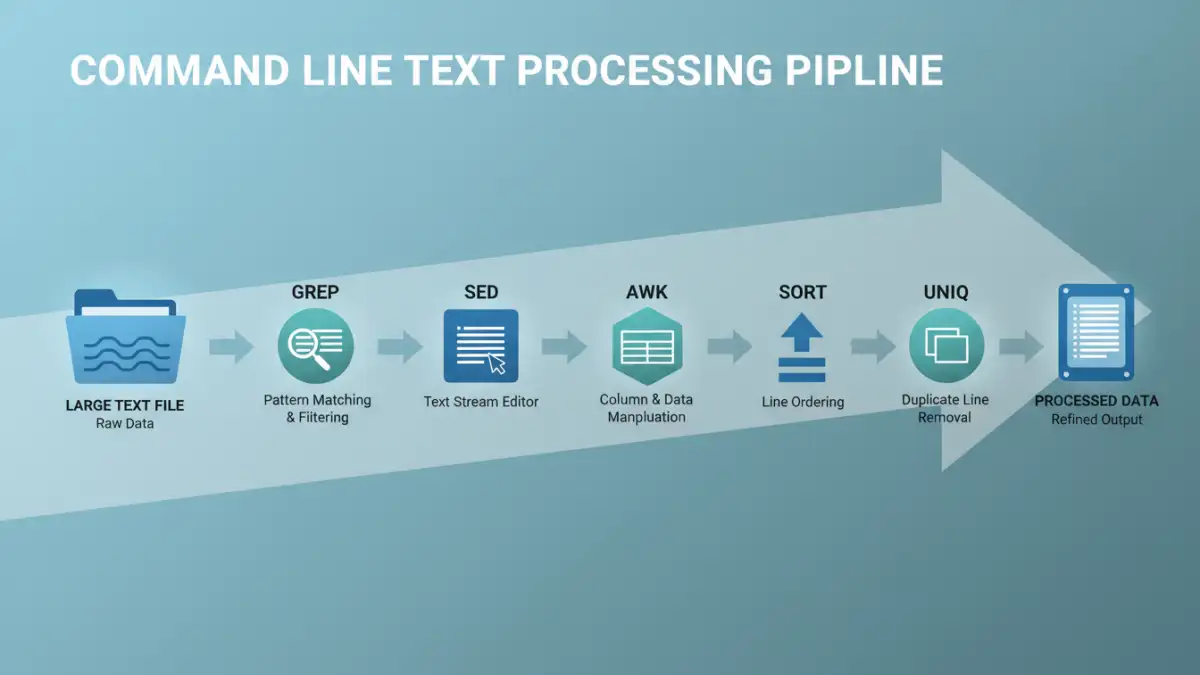
The primary hurdle with very large text files is memory consumption. Standard applications try to load the entire file into RAM, which is simply not feasible when dealing with files that are orders of magnitude larger than available memory. This leads to slow performance, system instability, and often, application failure. Command line tools circumvent this by processing files line by line or in manageable chunks.
Memory Limitations and Throughput
Another challenge is speed. Even if a file could be loaded, the time it takes to perform operations across millions or billions of lines can be prohibitive. Command line utilities are often written in low-level languages and optimized for high throughput, making them significantly faster for repetitive tasks on large volumes of data.
Essential Command Line Text Tools

Several core utilities form the backbone of command line text processing. Familiarity with these tools is crucial for efficient large file management.
grep: Filtering with Precision
The grep command is indispensable for searching text using patterns. It can quickly find lines containing specific keywords, regular expressions, or character sequences. For instance, to find all lines containing 'error' in a massive log file, you'd simply use grep 'error' large_log_file.log. Its ability to work with streams makes it perfect for large files.
sed: Stream Editing
sed (stream editor) is a powerful tool for performing text transformations on an input stream or file. It excels at find-and-replace operations, deletions, and insertions, all without loading the entire file. A common use case is replacing all occurrences of a word: sed 's/old_word/new_word/g' input_file.txt > output_file.txt. This processes the file sequentially, writing changes to a new file.
awk: Pattern Scanning and Processing
awk is a more sophisticated tool that allows for complex data extraction and reporting. It reads files line by line, splitting each line into fields, and allows you to perform actions based on patterns or conditions. This makes it ideal for structured text data, like CSV or log files with consistent formatting. You can easily sum columns, filter records based on multiple criteria, or reformat output.
sort and uniq: Ordering and Uniqueness
sort arranges lines of text files in lexicographical or numeric order. When dealing with large datasets, it can efficiently sort massive amounts of data. uniq, often used after sort, filters adjacent duplicate lines. Combining them, like sort large_file.txt | uniq -c, is a common pattern for counting unique occurrences of lines.
Practical Processing Techniques
Let's look at some common scenarios and how these tools can be applied for effective large text file processing.
Extracting Specific Log Entries
Imagine a web server log file that's several gigabytes. To find all requests made by a specific IP address, you could use grep '192.168.1.100' access.log. If you need to count how many times a particular URL was accessed, you might combine grep with awk: grep '/api/v1/data' access.log | awk '{count++} END {print count}'.
Data Transformation and Cleaning
Suppose you have a large CSV file where a specific column needs to be updated. Using sed for simple replacements or awk for more complex conditional logic is highly efficient. For example, to change a value in the third column of a CSV only if the first column matches a certain ID: awk -F',' '$1 == "ID123" {$3 = "new_value"; print $0}' input.csv > output.csv. The -F',' sets the field separator to a comma.
Advanced Strategies for Efficiency
For truly enormous files, even line-by-line processing can take time. Combining tools using pipes is a fundamental strategy. For example, to find the top 10 most frequent IP addresses in a log file:
awk '{print $1}' access.log | sort | uniq -c | sort -nr | head -n 10
This pipeline first extracts the IP addresses (field 1), sorts them, counts unique occurrences, sorts the counts numerically in reverse order, and finally, takes the top 10. Each command operates on the output of the previous one, minimizing memory usage.
Using `split` for Chunking
If you need to process a file in smaller, manageable parts, the split command is invaluable. It can break a large file into smaller files based on line count, byte count, or even a prefix pattern. This allows parallel processing or easier handling by tools with stricter memory limits.
Best Practices for Large Files
When approaching text file efficiency, several best practices can save you time and system resources.
Test on Smaller Samples
Before running a complex command on a multi-gigabyte file, always test your script or command on a smaller subset of the data. This helps catch syntax errors and logic flaws quickly.
Understand Your Data
Knowing the structure and content of your file is key. Are fields delimited by spaces, tabs, or commas? Are there specific patterns you can leverage? This understanding will help you choose the right tools and options.
Redirect Output
Always redirect the output of your commands to a new file (e.g., > output.txt) rather than trying to modify the original file in place, especially with tools like sed. This provides a safety net and avoids data loss if something goes wrong.
Comparison Table
| Command | Primary Use Case | Strengths | Weaknesses | Example Usage |
|---|---|---|---|---|
| grep | Pattern searching and filtering | Fast, simple pattern matching, works on streams | Limited transformation capabilities | grep 'keyword' file.txt |
| sed | Stream editing (find/replace, delete) | Efficient text manipulation, non-interactive | Steeper learning curve for complex operations | sed 's/old/new/g' file.txt |
| awk | Data extraction, reporting, field processing | Powerful pattern scanning and actions, handles structured data well | More complex syntax than grep/sed | awk '{print $1}' file.txt |
| sort | Ordering lines | Handles very large datasets, various sorting options | Can be memory intensive for extremely large files without specific options | sort file.txt |
| uniq | Removing duplicate adjacent lines | Simple and effective when paired with sort | Only works on adjacent lines (requires sort) | sort file.txt | uniq -c |