When dealing with sensitive information, especially in digital formats like PDFs, maintaining the integrity of the data is paramount. Whether you're handling financial reports, legal contracts, or personal records, ensuring that the document hasn't been altered or corrupted since its creation is crucial for trust and compliance. This involves implementing measures that prevent unauthorized modifications and verify the authenticity of the content.
Table of Contents
Understanding Data Integrity in PDFs
Data integrity refers to the accuracy and consistency of data over its entire lifecycle. For PDF documents, this means ensuring that the content remains unchanged and that its origin can be verified. In a world where digital documents are routinely shared and stored, the risk of accidental corruption or deliberate manipulation is ever-present.
Why is PDF Data Integrity Important?
Maintaining pdf data integrity is vital for several reasons. It builds trust between parties, ensures compliance with regulations, and prevents legal disputes arising from altered documents. Imagine a contract that has been subtly modified after signing; the implications could be severe. Therefore, robust measures are needed to safeguard these digital assets.
Methods to Ensure PDF Data Integrity
Several techniques can be employed to bolster the integrity of PDF files. These range from simple password protection to more sophisticated cryptographic methods. Understanding these options allows you to choose the most appropriate solution based on the sensitivity of the data and the intended use of the document.
Password Protection
The most common method is password protection. PDFs can be encrypted with a password, restricting access to authorized users. This protection can be set to prevent opening the document or to limit specific actions like printing, copying text, or editing. While effective for basic security, it's not foolproof against determined attackers.
Encryption Standards
More advanced encryption standards, such as AES (Advanced Encryption Standard), offer much stronger security. When a PDF is encrypted using these algorithms, the data is rendered unreadable without the correct decryption key, typically derived from a password. This significantly enhances document integrity by making unauthorized access and modification exceedingly difficult.
The Role of Digital Signatures
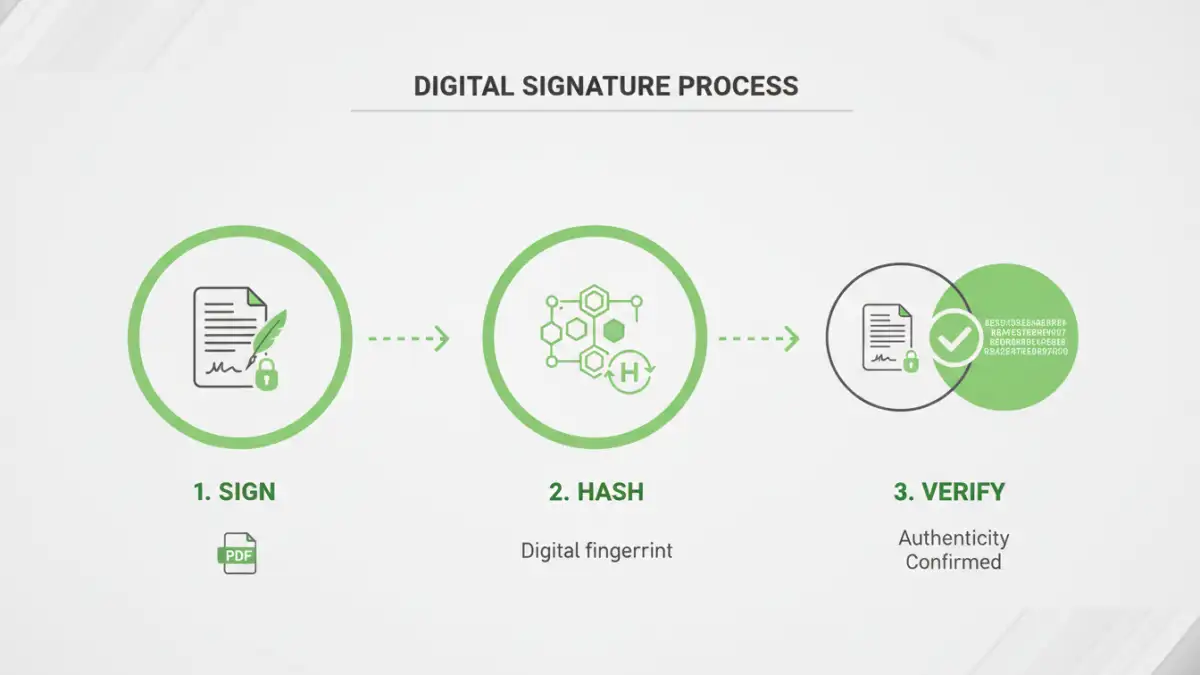
Digital signatures are a cornerstone of ensuring document authenticity and integrity. They are cryptographic mechanisms that verify the identity of the signer and confirm that the document has not been altered since it was signed. This is achieved through a process involving hashing the document and encrypting the hash with the signer's private key.
Verifying Authenticity
When a recipient opens a digitally signed PDF, their PDF reader can use the signer's public key to decrypt the hash. It then recalculates the hash of the document content. If the decrypted hash matches the recalculated hash, it proves that the document is indeed from the claimed signer and that its content remains unchanged. This is a powerful tool for secure pdf forms and official documentation.
Document Tampering Prevention Strategies
Beyond encryption and digital signatures, other strategies can further prevent document tampering. These often involve workflow controls and careful management of document distribution. Implementing a layered security approach is always more effective than relying on a single method.
Access Control and Permissions
Limiting who can access and interact with a document is a fundamental step. PDF software often allows setting granular permissions, such as preventing editing, copying, or printing. This helps ensure that even if a document falls into the wrong hands, its contents cannot be easily altered or extracted.
Audit Trails
For critical documents, maintaining an audit trail can be invaluable. This involves logging all actions performed on the document, including who accessed it, when, and what changes (if any) were made. While not directly preventing tampering, audit trails provide accountability and help detect unauthorized activities.
Best Practices for Maintaining Integrity
Consistently applying best practices is key to maintaining strong pdf data integrity over time. This involves a combination of technical measures and procedural controls.
Regular Backups
Always maintain regular, secure backups of your important PDF documents. This ensures that even if a file becomes corrupted or is accidentally deleted, you have a reliable copy to restore from. Store backups in multiple locations, including offsite or cloud storage, for added protection.
Use Reputable Software
When creating, editing, or securing PDFs, always use reputable software. Trusted applications from established vendors are more likely to implement security features correctly and protect against vulnerabilities that could compromise data integrity.
Comparison Table: PDF Security Features
| Feature | Description | Effectiveness for Integrity | Ease of Use |
|---|---|---|---|
| Password Protection (Open) | Requires password to open the document. | High (prevents unauthorized viewing) | Easy |
| Password Protection (Permissions) | Restricts actions like printing, editing, copying. | Medium (prevents casual modification) | Easy |
| AES Encryption | Strong cryptographic algorithm to scramble data. | Very High (makes data unreadable without key) | Medium (requires specific software) |
| Digital Signatures | Cryptographically verifies signer and document integrity. | Very High (detects any alteration) | Medium (requires certificate/setup) |
| Watermarking | Adds visible or invisible marks to identify origin/status. | Low (primarily for branding/tracking, not integrity) | Easy |