I recently helped a colleague who was struggling to balance quick PDF edits with the need to maintain stringent security for sensitive project documents. It's a common dilemma: the allure of readily available online tools versus the robust features and control offered by traditional desktop software. Deciding which approach is best for your specific needs, especially when it comes to document integrity and protecting confidential information, can be a complex choice.
This isn't just about editing text; it's about safeguarding intellectual property, client data, and compliance records. Over my years in software engineering, I've seen countless tools emerge, each promising a better way to handle PDFs. But when security is paramount, the distinction between online convenience and offline capability becomes critically important.
Table of Contents
The Evolving Landscape of PDF Management
PDFs have become the standard for sharing documents across different platforms and ensuring content fidelity. From contracts to reports, their fixed layout makes them ideal for professional communication. However, the need to edit these documents—whether to correct a typo, redact sensitive information, or add a signature—is equally prevalent.
Beyond simple edits, the imperative for robust security has grown exponentially. With increasing cyber threats and regulatory requirements like GDPR and HIPAA, ensuring the confidentiality and integrity of digital documents is no longer optional. This drives the core question: how do we achieve effective pdf editing security in a world that values both speed and safety?
Online PDF Editors: Convenience and Limitations
Online PDF editors have boomed in popularity, offering a seemingly effortless way to manipulate documents directly from a web browser. They require no installation and are accessible from any device with an internet connection, making them incredibly convenient for quick tasks.
Many offer basic editing functions like text and image manipulation, merging, splitting, and converting file formats. Their ease of use often makes them a first choice for individuals and small businesses needing immediate solutions.
Accessibility and Collaboration
The primary appeal of online tools lies in their accessibility. You can upload a PDF, make changes, and download it within minutes, often for free or with a low-cost subscription. This is particularly useful for remote teams or individuals working on the go, facilitating quick turnarounds and collaborative efforts without software compatibility headaches.
Some platforms even integrate with cloud storage services, streamlining workflows further. This seamless integration can save significant time, especially when dealing with multiple stakeholders or tight deadlines.
Security Considerations for Online Tools
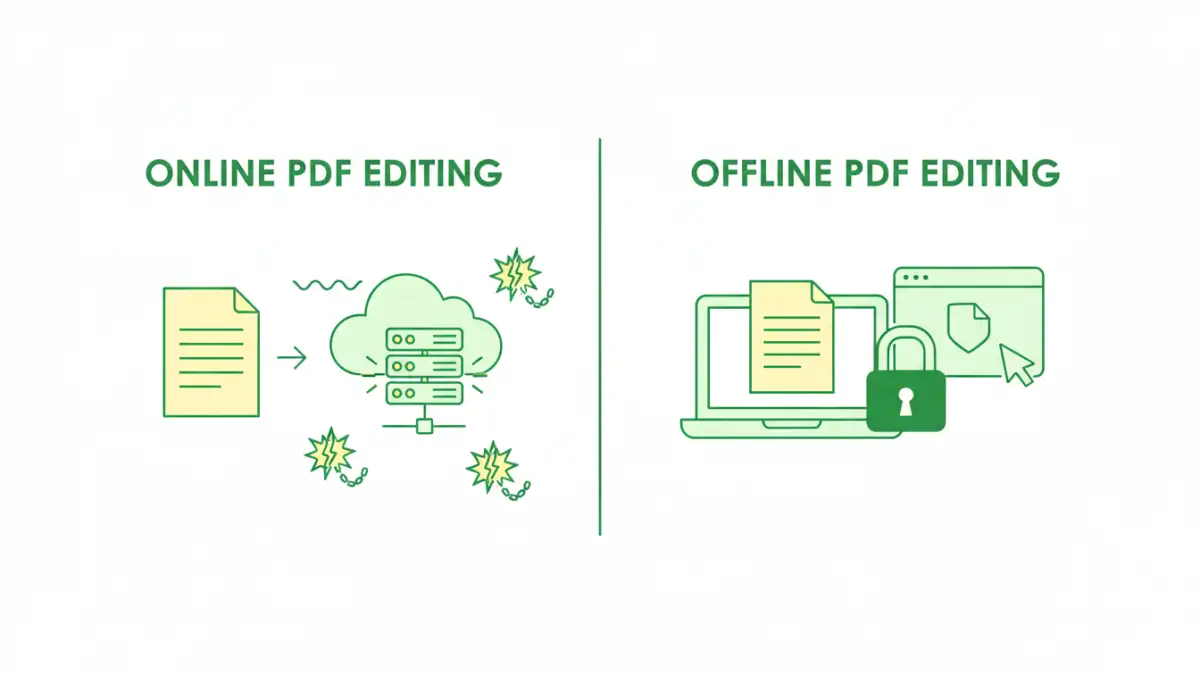
While convenient, the security posture of online PDF editors is a critical concern, especially for sensitive data. When you upload a document to an online service, you are essentially trusting a third-party server with your data. This raises questions about data privacy, encryption during transfer and storage, and who has access to your files.
Many reputable online services employ strong encryption (like HTTPS) for data in transit and at rest, and claim to delete files after a certain period. However, the risk of data breaches or unauthorized access, even if minimal, is always present. For highly confidential documents, this level of exposure might be unacceptable, making robust online pdf protection a complex challenge.
Offline PDF Software: Power and Control
Desktop PDF software, such as Adobe Acrobat Pro or Foxit PhantomPDF, represents the traditional approach to PDF management. Installed directly on your computer, these applications offer a comprehensive suite of features that typically far exceed what online tools can provide.
The initial investment in terms of cost and installation time is often higher, but for professional users or those with extensive PDF needs, the benefits usually outweigh these factors. They provide a local, controlled environment for all your document tasks.
Robust Features and Performance
Offline software is built for power users. It offers advanced editing capabilities, including precise text and image adjustments, Bates numbering, form creation, OCR (Optical Character Recognition), and sophisticated redaction tools. Performance is generally superior as well, especially when handling large or complex documents, since processing occurs locally on your machine rather than relying on internet speeds.
Many desktop applications also integrate deeply with other professional software, enhancing workflows for document creation, review, and archival. These comprehensive desktop pdf features provide an unparalleled level of control over your documents.
Enhanced Security with Desktop Solutions
One of the most compelling arguments for offline software is its superior security. Your documents never leave your local machine or a controlled network, significantly reducing exposure to external threats. This is crucial for maintaining document integrity and confidentiality.
Desktop applications typically offer advanced security features, including robust encryption (256-bit AES), digital signature capabilities for authentication and non-repudiation, and granular permission controls. These tools allow you to create a truly secure pdf editor environment, ensuring that only authorized individuals can view, print, or modify your files, and that changes can be tracked and verified.
Navigating PDF Editing Security Concerns
Regardless of whether you choose online or offline, several key security practices are essential. Encryption is foundational; always use strong passwords and encryption settings when protecting your PDFs. Digital signatures provide authenticity and verify that a document hasn't been tampered with since it was signed, critical for legal and financial documents.
Redaction tools are vital for removing sensitive information permanently, not just visually obscuring it. Compliance with industry standards and regulations should always guide your choice of tools and your practices. Ensuring document integrity means not just preventing unauthorized access, but also guaranteeing that the document's content remains unchanged and trustworthy.
Making the Right Choice: Online vs. Offline
The decision between online tools and offline software for your pdf editing security needs boils down to your specific requirements and risk tolerance. For quick, non-sensitive edits, online tools offer unmatched convenience. However, when dealing with confidential, legally binding, or highly sensitive information, the control and advanced security features of desktop software are invaluable.
As a software engineer who's seen the consequences of data breaches, I always lean towards offline solutions for critical documents. It's about minimizing the attack surface and maintaining full ownership of your data's security. For less sensitive tasks, a well-vetted online tool can be perfectly adequate, but always read their privacy policy carefully.
Comparison Table: Online Tools vs. Offline Software for PDF Editing & Security
| Feature/Aspect | Online PDF Tools | Offline PDF Software | Best For |
|---|---|---|---|
| **Accessibility** | Any device, browser-based | Installed on specific devices | Quick edits on the go |
| **Security & Privacy** | Dependent on vendor, data uploaded to cloud | Local processing, higher control | Highly sensitive documents |
| **Feature Set** | Basic editing, conversion, merging | Advanced editing, OCR, redaction, forms, digital signatures | Simple, one-off tasks |
| **Cost** | Often free for basic use, subscription for advanced | One-time purchase or recurring license | Budget-conscious users (online) |
| **Performance** | Can be slower with large files, internet-dependent | Fast, handles large files efficiently | Professional, high-volume users |
| **Document Integrity** | Risk of server-side issues, less control | Full control over file lifecycle and authenticity | Legal, financial, and compliance documents |