
Working with sensitive data means the need for robust protection is paramount. Whether it's confidential business documents, personal financial records, or proprietary research, ensuring only authorized individuals can access these files is critical. This is where advanced file protection tools come into play, offering layers of security beyond basic operating system features.
Over my years in software engineering, I've seen firsthand how crucial effective file security is. Many standard methods offer basic protection, but for truly sensitive information, a more comprehensive approach is often required. This involves understanding the different types of protection available, the tools that implement them, and how to best leverage them for maximum security.
Table of Contents
Understanding File Protection Methods
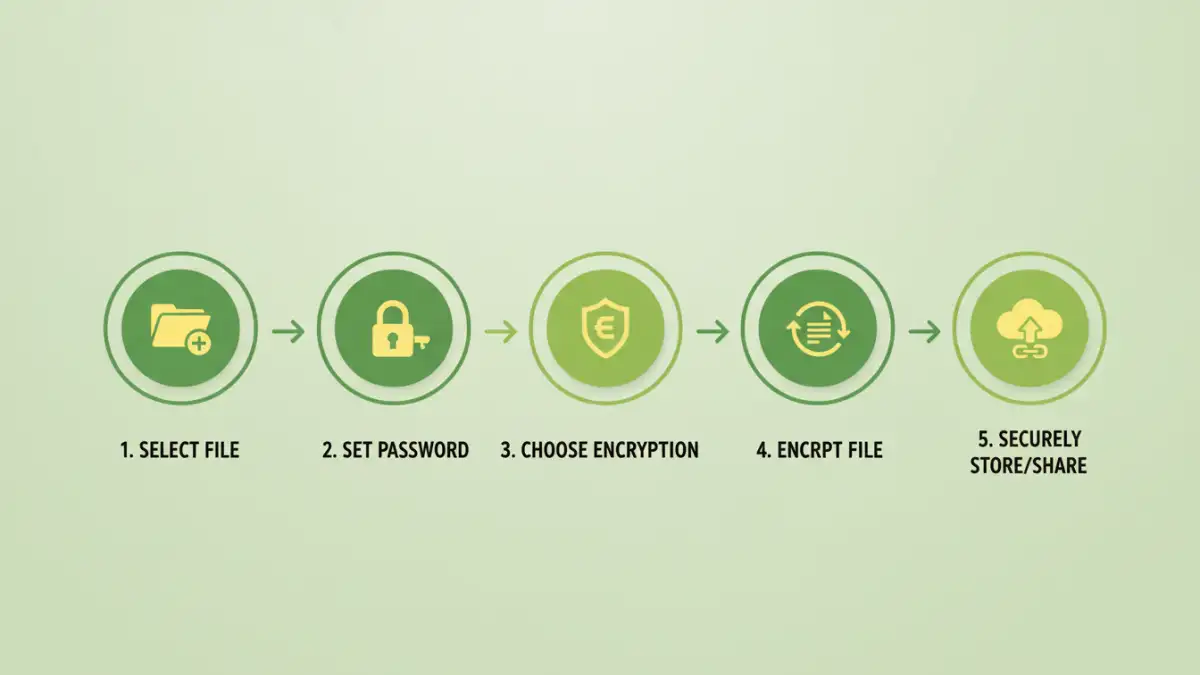
At its core, password file protection involves using a password to encrypt or restrict access to a file. This can range from simple password prompts built into applications like Microsoft Word or Adobe Acrobat to more complex, system-level encryption.
Encryption vs. Access Control
It's important to distinguish between encryption and simple access control. Encryption scrambles the file's data, making it unreadable without the correct decryption key (the password). Access control, on the other hand, might simply prevent opening the file without a password but doesn't necessarily alter the file's content. Premium tools often combine both for layered security.
Exploring Premium Tool Categories

The landscape of file protection tools is diverse. We can broadly categorize them based on their functionality and how they are accessed, which helps in selecting the right solution for specific needs.
Desktop Software Solutions
These are applications installed directly onto your computer. They often offer the most comprehensive features, including strong encryption algorithms (like AES-256), batch processing, and integration with your operating system. I've found these to be reliable for handling large volumes of sensitive data locally.
Online File Protection Services
Web-based tools provide convenience and accessibility from any device with an internet connection. While many offer free basic protection, premium versions often include enhanced security, larger file limits, and better privacy assurances. It's crucial to vet these services carefully regarding their data handling policies.
Integrated Operating System Features
Modern operating systems offer built-in file encryption capabilities, such as BitLocker on Windows and FileVault on macOS. While powerful for full-disk encryption, they might not always offer granular control over individual files or folders as effectively as dedicated premium password protected file solutions.
Key Features in Premium Tools
When evaluating premium password protected file options, several features stand out as essential for robust secure file management. Prioritizing these can significantly enhance your protection strategy.
Strong Encryption Standards
Look for tools that support industry-standard encryption algorithms like AES (Advanced Encryption Standard), preferably AES-256. This ensures your data is highly resistant to brute-force attacks. The strength of the encryption is paramount for true security.
User-Friendly Interface and Workflow
Even the most secure tool is ineffective if it's too complex to use. A good premium tool should offer an intuitive interface that simplifies the process of password setting, file encryption, and decryption. This also aids in consistent application of password file protection.
Audit Trails and Logging
For businesses or individuals who need to track access, audit trails are invaluable. Premium solutions may offer logging features that record who accessed a file, when, and if any actions were performed. This provides accountability and helps in security monitoring.
Multi-Factor Authentication Support
Beyond a simple password, some advanced tools support multi-factor authentication (MFA). This adds an extra layer of security by requiring a second form of verification, such as a code from a mobile app or a hardware token, in addition to the password.
Implementation Strategies
Effectively implementing password protection isn't just about choosing a tool; it's about integrating it into a broader security strategy. This ensures that the protection remains effective over time.
Granular Access Control
Instead of password-protecting entire drives or folders unnecessarily, focus on individual files or smaller, sensitive collections. This approach minimizes the risk associated with a single compromised password and simplifies management.
Regular Password Updates and Complexity
It's a common pitfall to reuse weak passwords. For premium password protected file solutions, implementing a policy for regular password changes and enforcing strong password complexity (a mix of upper/lowercase letters, numbers, and symbols) is vital. Consider using a password manager to handle complex, unique passwords.
Best Practices for File Security
Beyond the technical aspects of password file protection, adopting good security habits is essential. These practices complement the tools and create a more secure environment for your data.
Educate Users
If multiple people need access, ensure they understand the importance of password security, the risks of sharing passwords, and how to use the protection tools correctly. Training is a key component of secure file management.
Regular Backups
Always maintain secure, encrypted backups of your important files. Losing access to a file due to a forgotten password or a corrupted file can be devastating. Ensure your backup strategy also includes robust password protection.
Comparison Table: Premium File Protection Tools
| Tool Type | Primary Use Case | Security Level | Ease of Use | Cost | Considerations |
|---|---|---|---|---|---|
| Desktop Encryption Software | Comprehensive local file/folder protection | Very High (AES-256) | Moderate | Paid (One-time or Subscription) | Requires installation, system resources |
| Online File Encryption Services | Quick, convenient protection for shared files | High (Varies by provider) | High | Freemium to Paid Subscription | Privacy concerns, internet dependency |
| Built-in OS Encryption (e.g., BitLocker, FileVault) | Full disk or volume encryption | Very High | Moderate | Included with OS | Less granular control for individual files |
| Password Managers with File Vaults | Secure storage for small files/documents | High | High | Freemium to Paid Subscription | File size limits, focused on password management |