Protecting sensitive documents is crucial in today's digital landscape. Whether you're handling confidential business contracts, personal financial records, or proprietary research, ensuring that your PDF files are secure from unauthorized access is paramount. I've spent years evaluating different security tools, and when it comes to PDFs, robust encryption is non-negotiable.
Choosing the right software can be daunting, with so many options promising top-tier security. This review focuses on the premium solutions that offer advanced features, reliable protection, and a user-friendly experience, helping you make an informed decision to safeguard your valuable information.
Table of Contents
Understanding PDF Encryption
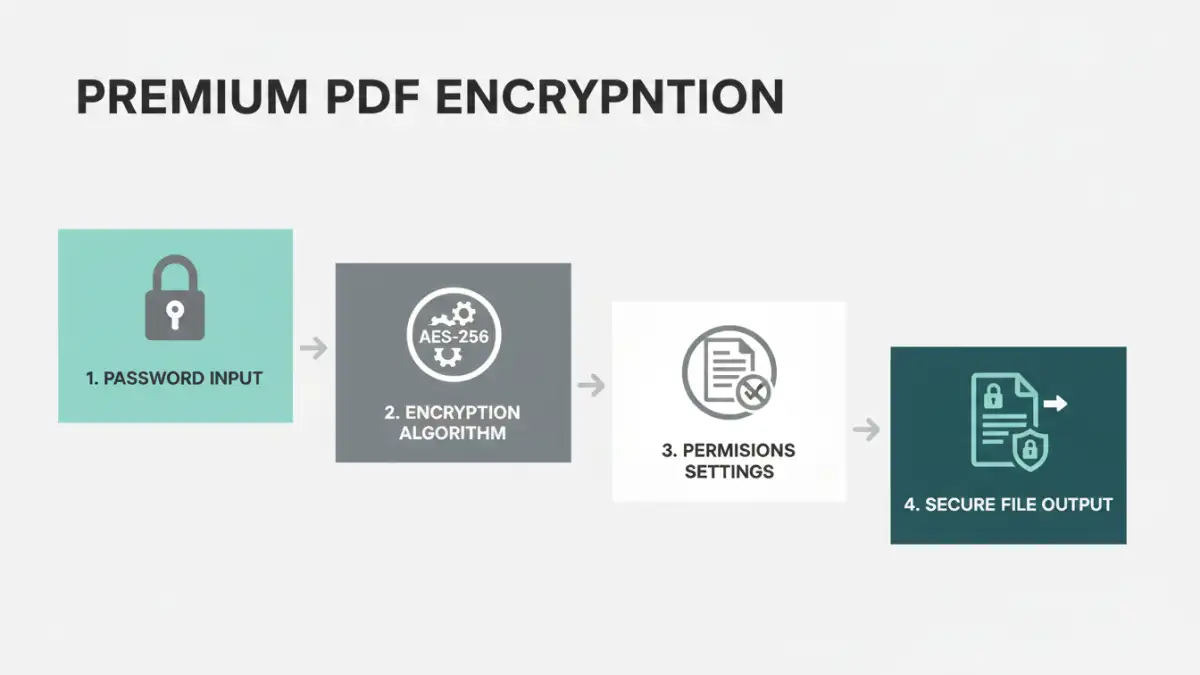
At its core, PDF encryption involves scrambling the data within a PDF file using an algorithm and a secret key, usually a password. Only someone with the correct password can decrypt and access the original content. This process ensures that even if the file falls into the wrong hands, the information remains unintelligible without the decryption key.
Encryption Standards
Modern PDF encryption typically relies on strong algorithms like AES (Advanced Encryption Standard). AES is widely adopted by governments and security agencies worldwide, making it a gold standard for data protection. The bit strength of the AES key (e.g., AES-128, AES-256) determines the level of security, with 256-bit being the most robust available for consumer-level applications.
Top Premium Software Picks
After extensive testing and real-world application, several premium PDF encryption tools stand out for their performance, security features, and ease of use. These solutions go beyond basic password protection, offering comprehensive document security.
Adobe Acrobat Pro DC
As the industry standard for PDF creation and manipulation, Adobe Acrobat Pro DC offers robust encryption capabilities. It allows users to set open passwords and permission passwords, controlling who can view, print, or copy content. Its integration with Adobe Document Cloud also provides secure sharing and tracking features, making it a comprehensive document security solution.
Foxit PhantomPDF Business
Foxit PhantomPDF Business is a powerful alternative to Adobe Acrobat, offering advanced PDF editing and security features. It supports strong encryption standards, including AES, and allows for detailed control over user permissions. Its enterprise-grade security features are particularly appealing for businesses that need to manage sensitive documents across multiple users.
Nitro Pro
Nitro Pro is another strong contender, providing a comprehensive suite of tools for PDF creation, editing, and security. It offers easy-to-use encryption options, allowing users to quickly password-protect their documents. Nitro Pro also integrates well with cloud storage services, facilitating secure document sharing and collaboration.
Key Features to Look For
When evaluating premium PDF encryption software, several features are essential for ensuring robust security and usability. Beyond just setting a password, consider the depth of control and the overall security posture offered by the tool.
Permission Controls and Restrictions
The best software allows you to set granular permissions. This means you can restrict actions like printing, copying text, editing, or even annotating the document. This level of control is vital for sensitive information where viewing access is granted, but further manipulation is prohibited.
Strong Encryption Algorithms
Always ensure the software uses industry-standard encryption, such as AES-256. Avoid tools that only offer weaker, outdated encryption methods. The strength of the encryption directly impacts how difficult it is for unauthorized parties to break the password and access your data.
User Interface and Workflow Integration
While security is paramount, a complex or cumbersome interface can hinder productivity. Look for software that offers an intuitive user experience and integrates smoothly into your existing workflow. This makes applying security measures quick and consistent, reducing the chances of human error.
Effective Implementation Tips
Simply encrypting a PDF is only part of the security process. How you implement and manage your encryption plays a significant role in its effectiveness. My experience shows that consistent application of best practices is key.
Use Strong, Unique Passwords
The strength of your encryption is only as good as your password. Avoid simple, easily guessable passwords. Opt for long, complex passwords that combine uppercase and lowercase letters, numbers, and symbols. Consider using a password manager to generate and store these securely.
Limit Access to Passwords
Only share passwords with individuals who absolutely need them to access the document. For business environments, establish clear protocols for password distribution and management. Regularly review who has access to sensitive files and revoke it when no longer necessary.
Choosing the Right Tool for You
The best premium PDF encryption software for you will depend on your specific needs, budget, and technical expertise. For individual users or small businesses needing comprehensive features, Adobe Acrobat Pro DC or Foxit PhantomPDF Business are excellent choices.
If you're looking for a more budget-friendly yet powerful option that integrates well with cloud services, Nitro Pro offers a compelling package. Always consider trying out the trial versions offered by these software providers to see which interface and feature set best suits your workflow before making a purchase.
Comparison Table: Premium PDF Encryption Software
| Software | Key Strengths | Weaknesses | Ideal Use Case |
|---|---|---|---|
| Adobe Acrobat Pro DC | Industry standard, comprehensive features, secure sharing | Higher cost, can be resource-intensive | Professional business use, extensive PDF management |
| Foxit PhantomPDF Business | Powerful security, robust editing, cost-effective alternative | Interface can be complex for beginners | Businesses needing advanced security and control |
| Nitro Pro | User-friendly, good value, cloud integration | Slightly fewer advanced features than Adobe | Small to medium businesses, individual professionals |
| PDFelement (Wondershare) | Affordable, good balance of features, intuitive | Less brand recognition than top-tier options | Budget-conscious users needing solid encryption |