
The challenge of moving substantial amounts of data from text files into a structured database is a common hurdle for many developers and data professionals. Whether you're migrating legacy data, processing log files, or integrating external datasets, doing this efficiently without compromising data integrity or system performance is crucial. I've encountered this numerous times, and it always boils down to planning and using the right techniques.
Handling large datasets requires a strategic approach. Simply trying to load everything at once can lead to timeouts, memory errors, and corrupted data. It's about breaking down the problem into manageable parts and employing tools and methods designed for scale. This guide will walk you through the best practices to ensure your database import is smooth and successful.
Table of Contents
Understanding the Challenges
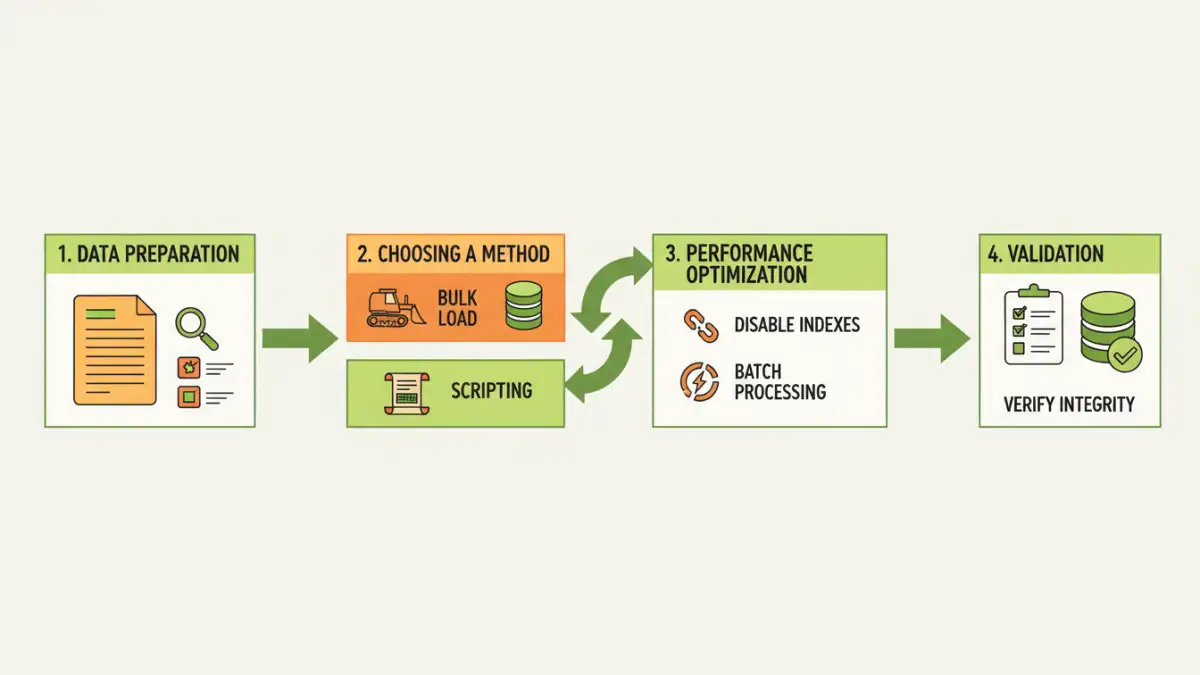
When dealing with large text files, several issues can arise. The sheer volume of data can overwhelm system resources, leading to slow processing times or outright failures. Text files themselves might contain inconsistencies, such as varying delimiters, encoding issues, or malformed records, which can complicate the parsing process.
Furthermore, the target database schema might not perfectly align with the text file's structure. Identifying and resolving these discrepancies *before* or *during* the import is essential to prevent data loss or corruption. My experience shows that neglecting these upfront challenges is a recipe for disaster.
Common Pitfalls to Avoid
One of the most frequent mistakes is attempting a single, monolithic import operation. This rarely works for files exceeding a few hundred megabytes. Another pitfall is not properly cleaning the source data, leading to unexpected errors during the import phase. Finally, failing to test the import process with a representative subset of data can hide performance bottlenecks or logical errors.
Data Preparation is Key

Before any import, thorough data preparation is non-negotiable. This involves cleaning the text file, standardizing formats, and ensuring it's ready for database ingestion. This phase significantly reduces the likelihood of errors during the actual import process.
Cleaning and Standardization
This step typically involves: removing unnecessary characters, handling missing values (e.g., replacing with NULL or a default value), standardizing date and number formats, and ensuring consistent encoding (like UTF-8). If your text file uses different delimiters or quoting rules, you'll need to address those as well. I've found that a good script to preprocess the file can save hours of debugging later.
Choosing the Right Import Methods
The method you choose depends on the database system, the file size, and your technical comfort level. Each has its own trade-offs in terms of speed, complexity, and resource usage.
Leveraging Bulk Loading Utilities
Most database systems offer specialized tools for efficient data loading. For example, PostgreSQL has `COPY`, MySQL has `LOAD DATA INFILE`, and SQL Server has `BULK INSERT` or the `bcp` utility. These tools are highly optimized for performance, often bypassing some of the overhead associated with standard INSERT statements. They are generally the fastest way to import large text files.
When using these utilities, it's crucial to configure them correctly. This includes specifying delimiters, quote characters, escape characters, and handling of NULL values. Properly tuning these parameters can dramatically speed up the process. I always recommend starting with the database's native bulk loader if available.
Scripting and Programmatic Imports
For more complex transformations or when native tools aren't sufficient, scripting languages like Python (with libraries like Pandas or SQLAlchemy) or other programming languages can be used. These offer greater flexibility to parse, transform, and load data in chunks.
Using a chunking strategy is vital here. Instead of reading the entire file into memory, you read and process it in smaller, manageable batches. This prevents memory exhaustion and allows for more granular error handling. For instance, you might read 10,000 rows, process them, insert them into the database, and then repeat.
Performance Optimization Techniques
Beyond choosing the right tool, several techniques can significantly boost import performance. These optimizations focus on reducing the work the database has to do and minimizing I/O operations.
Disabling or deferring index updates and constraints until after the import is a common strategy. Indexes and constraints add overhead to each insert operation. By temporarily removing them and rebuilding them once the data is loaded, you can achieve substantial speedups. Similarly, performing the import within a single transaction can sometimes improve performance, though it also increases the risk of losing all work if an error occurs.
Data Validation and Error Handling
Even with careful preparation, errors can occur during the import. Robust validation and error handling are critical for ensuring data quality and for diagnosing issues.
Implement checks at various stages: validate the file format before import, log any rows that fail to import, and perform post-import checks to verify data integrity. Some bulk loading utilities allow you to specify error logging tables, which is incredibly useful for reviewing problematic records. For scripted imports, use try-except blocks to catch errors gracefully and log the problematic data, allowing you to retry or fix it later.
Comparison Table: Import Methods
| Method | Pros | Cons | Best For |
|---|---|---|---|
| Database Bulk Load Utilities (`COPY`, `LOAD DATA INFILE`, `BULK INSERT`) | Highly optimized for speed, efficient resource usage. | Can be less flexible for complex transformations during import. | Large datasets, standard CSV/TSV formats. |
| Scripting with Chunking (e.g., Python/Pandas) | Maximum flexibility for transformations, granular error handling. | Can be slower than native utilities if not optimized, requires coding. | Complex data cleaning/transformation needs, custom logic. |
| Database Client Tools (e.g., pgAdmin, MySQL Workbench import wizards) | User-friendly GUI, good for smaller files or interactive use. | Often not suitable or very slow for extremely large files due to overhead. | Smaller files, quick imports, interactive exploration. |